Photo by NG Creative on Unsplash
Pinterest can do more than showcase products. It can help shoppers discover them while they’re looking for ideas and planning purchases. A practical approach to using Pinterest for e-commerce sales starts with a business account connected to your shop, then builds visibility with Pins that match the words people search.
Think of Pinterest as a visual discovery platform where people save ideas and products to explore later. Unlike a feed centred on immediate updates, it gives shoppers a place to collect inspiration. An effective product Pin needs to show the item clearly and make its relevance easy to understand.
This guide lays out a practical process for setting up Pinterest for your store, writing keyword-focused Pin titles and descriptions, organising boards and planning a steady flow of content. You’ll also learn how to track performance and identify which Pins attract attention and visits, then refine your approach based on the results.
Key Takeaways
- Set up a Pinterest business account and connect your shop so product discovery can lead towards a relevant product page.
- Use clear, search-led Pin titles, descriptions and board names to help shoppers understand what each product offers.
- Plan a consistent mix of product and lifestyle Pins, then review performance to identify which content earns attention and visits.
- Make product imagery easy to scan, with considered layouts and text overlays that clarify the item without crowding the visual.
- Connect Pinterest activity with paid social and email or CRM marketing when you need a more joined-up approach to customer acquisition and retention.
Pinterest’s shopping audience and product discovery
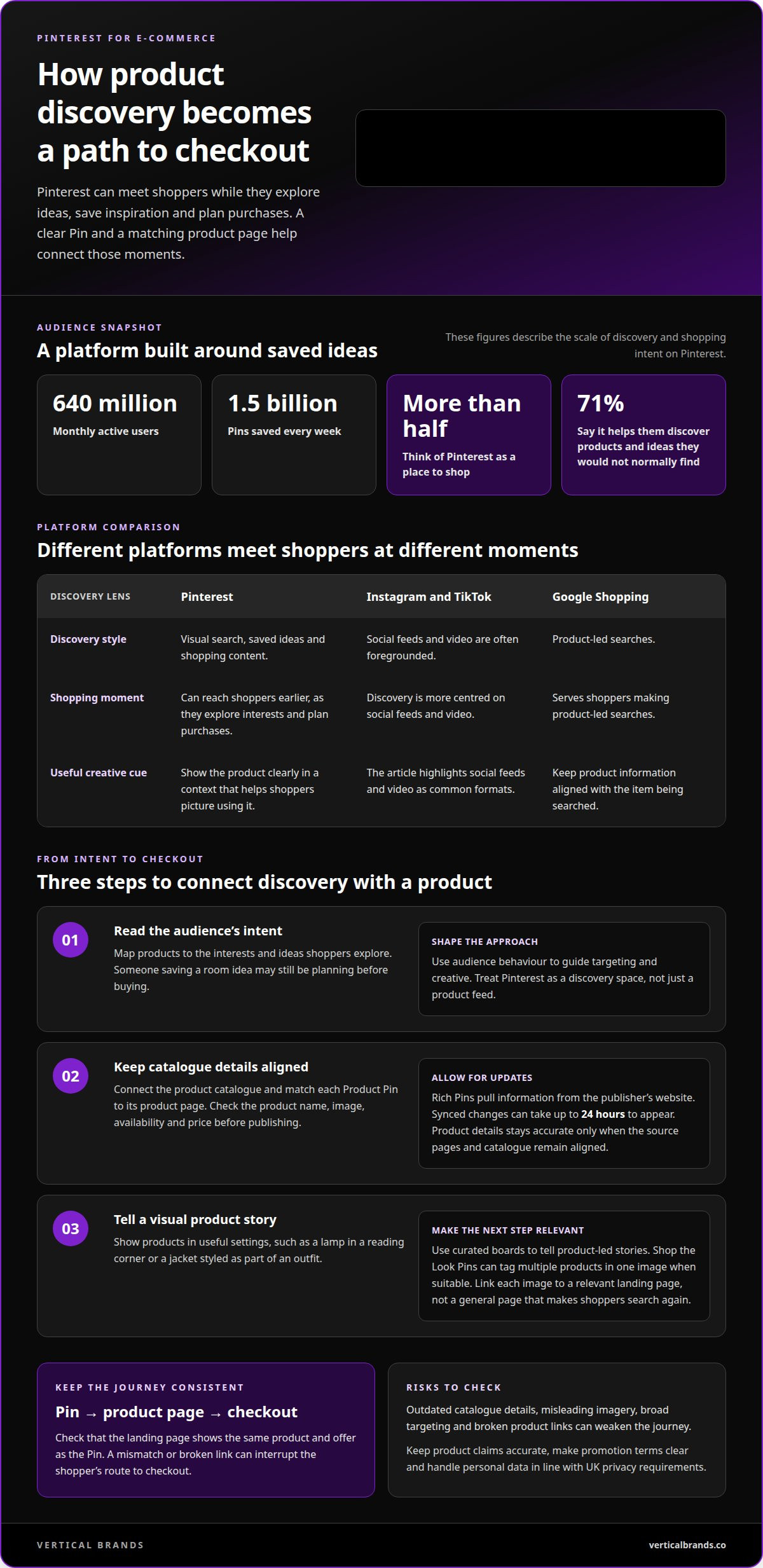
Pinterest supports product discovery through visual search, saved ideas and shopping content. Its audience reaches 640 million monthly active users, and people save 1.5 billion Pins every week.
Build your approach around how shoppers discover, assess and buy products. These steps connect audience intent with accurate product information and a clear path to checkout.
-
Identify Pinterest’s shopping audience
Map your products to the interests and ideas shoppers explore on Pinterest. More than half of its monthly active users think of the platform as a place to shop, while 71% say it helps them discover products and ideas they would not normally find. Use those behaviours to shape targeting and creative. Avoid treating Pinterest like a simple product feed: a shopper saving a room idea may be planning before buying.
-
Optimise product catalogues and Pins
Connect a product catalogue and align each Product Pin with its matching product page. Check the product name, image, availability and price against the page before publishing. Pinterest Rich Pins pull information from the publisher’s website, and synced changes can take up to 24 hours to appear. Product details stays accurate only when your source pages and catalogue remain aligned. A mismatch can interrupt conversion when a shopper reaches the merchant’s site to complete checkout.
-
Tell visual stories with product imagery
Show products in contexts that help shoppers picture using them, such as a lamp styled in a reading corner or a jacket as part of an outfit. Curated Pinterest boards can tell product-led stories without relying on sales copy. Use Shop the Look Pins to tag multiple products in one image when the format suits the scene. Link each image to a relevant landing page, rather than a general page that makes shoppers search again.
Pinterest differs from Instagram and TikTok because discovery centres on saved visual ideas, while those platforms often foreground social feeds and video. Google Shopping serves product-led searches; Pinterest can reach shoppers earlier, as they explore interests and plan purchases.
Keep product claims accurate, make promotion terms clear and handle personal data in line with UK privacy requirements. Pinterest ad approval doesn’t remove your responsibility to present products and offers honestly.
Promoted Pins can use Product Pins or Shop the Look Pins, with targeting set in Ads Manager. UK costs depend on campaign budget and targeting. Set spend in relation to your margin and conversion goals, rather than assuming a standard rate.
Common risks include outdated catalogue details, misleading imagery, broad targeting and broken product links. Check the entire journey from Pin to checkout, including whether the landing page shows the same product and offer.
Keyword-focused Pin titles, descriptions, and board names
Search-friendly wording helps Pinterest match Pins to relevant searches. Treat each title, description and board as a distinct cue for the visual content.
-
Choose keywords for Pin titles and descriptions
Start with the phrase a shopper might use to find the product, then place it naturally in the Pin title. Pinterest searches are 96% unbranded, so describe the item and its use rather than relying on your store name. For example, “linen tablecloth for relaxed dining” tells shoppers more than a brand-only title.
Keep titles within Pinterest’s 100-character limit and put the clearest phrase first. The feed displays only the first 50-60 characters of a Pin title and description, so lead with useful information. A title such as “Ceramic breakfast bowls for everyday dining” communicates the product before any text is cut off.
Use the description to add specific context, not a string of repeated keywords. Pinterest allows up to 500 characters; explain material, colour, use or style where those details match the product page. For a wool scarf, describe its colour and outfit pairing, then give shoppers a clear action, such as viewing the product.
Check that each keyword matches both the Pin and its destination page. A search phrase that attracts clicks but misrepresents the item can create friction and weaken conversion. These checks keep your wording useful to shoppers and consistent with your online store.
-
Optimise board names and visual curation
Name each board with a direct phrase that explains what it contains, such as “Small kitchen storage ideas” or “Neutral living room décor”. Keep board titles simple, self-explanatory and keyword-focused. Avoid vague labels such as “Inspiration” when a specific topic gives Pinterest a clearer signal.
Group Pins around a coherent shopper interest, product category or project. A board about small kitchens can combine storage products, layout ideas and practical styling, as long as every Pin fits the theme. Add relevant descriptions and keep unrelated products on separate boards.
Keep each Pin’s image, title, description and board aligned to build relevance in visual search. If a Pin shows a green velvet cushion, its text and board should reflect that product and style, not a different colour or category. This consistency helps Pinterest interpret the image and helps shoppers recognise what they’ll find after clicking.
Review boards as your range changes. Move outdated Pins, refresh descriptions when product categories shift, and make sure each board still serves a clear purpose. A disciplined keyword structure also supports wider search engine optimisation by keeping product language consistent across discovery channels.
Performance tracking and content planning
Establish a publishing rhythm, then assess how each Pin contributes to discovery, consideration and buying. Pinterest performance develops over time, so judge content by its purpose and look beyond immediate clicks.
- Plan a weekly schedule around buyer journey stages. For discovery, publish inspiration-led Pins that introduce a product category, such as a bedroom styling idea. For consideration, show product details, comparisons or practical uses. For buying, create a clear product-focused Pin that leads to the relevant page. A planned mix gives people useful reasons to return instead of repeating the same sales message.
Set a manageable cadence. The guide recommends publishing 3 to 10 Pins per day, but consistency matters more than posting without a content plan. Map themes to seasonal demand, product launches and existing website content. Keep a calendar with each Pin’s format, audience, destination and intended action.
- Choose a format that serves the content. Pinterest recommends vertical images with a 2:3 aspect ratio, ideally 1,000 pixels by 1,500 pixels. Use that layout for a product feature or step-by-step visual. For short demonstrations, create videos between 6 and 15 seconds, with the product and main point clear from the opening frame.
Match formats to the buying stage. A styling video can introduce a use case, while a product image can make features easier to assess. Keep a consistent visual identity across Pins, but vary the format and message. This lets a successful idea reach different audiences without simply duplicating one asset.
- Adapt social media and website material for Pinterest. Turn a blog tutorial into a sequence of visual steps, or give a social post a Pinterest-specific edit with a useful title and destination. Make sure each adaptation remains legible in a vertical format. Keep the image, message and landing page aligned instead of sending every Pin to your store’s homepage.
Build a backlog from product guides, customer questions and existing editorial themes. For example, a care guide can become separate Pins about cleaning, storage and material selection. Each asset should answer one clear question and lead to a relevant next step.
- Use Pinterest Analytics to review impressions, saves and outbound clicks. Compare results by format, topic and destination, then identify which Pins bring qualified visits. A high impression count indicates reach, while saves suggest future interest; clicks show movement towards your site. Together, these signals distinguish visibility from buying intent.
Allow for a longer evaluation window. Half of visits generated by a Pin take place more than 3.5 months after it first appears. Record publication dates and revisit older Pins before replacing them. Track landing-page behaviour alongside Pinterest activity to see whether clicks lead to meaningful product exploration.
Lifestyle imagery and text overlays
Use imagery to show the product in context, then make the Pin’s purpose clear. A considered visual can communicate use, scale and style before shoppers read the description.
- Choose a setting that helps shoppers picture the product in their own lives. Show a ceramic mug on a breakfast table rather than relying only on a plain product shot. For a coat, show how it looks as part of a complete outfit. Each setting should clarify the product, not distract from it.
Keep the item visible and recognisable. A cushion photographed against a busy patterned sofa may lose its shape. A simpler chair and neutral wall can make its colour and texture easier to assess. Images should reflect the actual product, so the visual promise matches the product page.
- Compose each image around one clear visual message. A skincare product could appear beside the routine it belongs to, while a storage basket could sit on a shelf with everyday objects. These scenes add context without making shoppers decode a crowded composition. Keep brand styling consistent through colour, lighting and props.
Use a close-up when details matter, such as the weave of a blanket or the finish of a table lamp. Choose a wider lifestyle scene when scale or placement matters. A useful image sequence can move from the full room to the product detail, directing attention without adding competing elements.
- Add a text overlay only when it gives information the image can’t communicate alone. “A softer finish for your living room” can clarify a cushion’s role. “Three ways to style a linen shirt” can introduce a practical idea. Keep the wording direct, readable and consistent with the destination page.
Prioritise contrast and legibility on mobile screens. Place text over uncluttered space, not across a patterned product or a person’s face. Avoid turning the image into a block of sales copy. A clear benefit or useful topic gives shoppers a reason to pause; the Pin title and description can provide supporting detail.
- Align visual language with search intent. Pinterest uses image signals alongside Pin text, while Google also relates visuals to the surrounding page content. A Pin about a compact hallway should show that setting and lead to a matching product or guide. Keep the image, overlay and destination consistent.
Review each creative before publishing. Check that the product stands out, text is readable and the scene supports the stated use. Remove props that imply an accessory is included when it’s only decorative. This accuracy check protects trust and keeps the visual experience aligned with the offer.
Setting up a Pinterest business account and connecting an e-commerce platform
Set up your account and product feed before planning campaigns. A connected catalogue gives Pinterest structured product information to use across discovery.
-
Create a Pinterest business account
Create a Pinterest business account, or convert an existing account through Pinterest’s account settings. Use your retailer name, a clear profile image and a description that reflects your products. Tie account ownership to a business-controlled email address so access doesn’t depend on one employee’s personal login.
Complete the profile and website-claiming steps Pinterest provides. This connects your online store to the account and gives you access to business features, including performance data. Check that the displayed domain and business details match the store shoppers will visit.
-
Connect an e-commerce platform
Open Pinterest’s business tools and follow the instructions to connect a catalogue or data source. Some platforms offer a direct integration; others require a product feed. Use the method supported by your store platform, and check product links and essential details before uploading a catalogue.
Test a small selection of products first. Compare each Pinterest item with its online-store page, including its name, image, price and availability. Product Pins typically direct shoppers to the merchant’s website to complete checkout, so a broken link or mismatched offer can disrupt the purchase journey.
-
Set up product catalogues and shopping features
Organise the catalogue around the products retailers want to make discoverable. Use accurate product identifiers and consistent information, then review the feed for missing images or destination links. Pinterest Rich Pins pull information from the publisher’s website, and catalogue changes can take up to 24 hours to appear.
Once products appear as Product Pins, use relevant Pins in campaigns and inspiration-led boards. Shop the Look Pins can tag multiple products in one image, such as individual pieces in an outfit. Pinterest no longer supports Buyable Pins, so direct shoppers to the relevant product page to complete checkout.
Before publishing, test the full route from a Pinterest Pin to checkout on your store. If catalogue setup or Pinterest content production needs a more structured approach, build the workflow around accurate product data and a useful shopping journey.
Vertical Brands
Vertical Brands helps e-commerce teams connect Pinterest activity with a wider digital growth strategy. If your Pins attract attention but the customer journey stalls, align discovery campaigns with paid social and paid search, then use email marketing and CRM management to support follow-up and retention. The right mix depends on where shoppers drop out, which channels already contribute and what your store needs next.
Turn to Vertical Brands when you need a clearer connection between product discovery, campaign performance and ongoing customer communication. A joined-up plan can help your team assess how content, paid activity and customer data should work together. Priorities differ: a store building awareness has different needs from one focused on repeat purchases.
Contact Vertical Brands to discuss how your Pinterest activity fits your wider growth priorities.
Turn Pinterest activity into a growth system
A disciplined approach to using Pinterest for e-commerce sales gives your store a foundation for learning and refinement. Next, connect discovery with what happens after a shopper clicks. Consider how product pages, follow-up and paid activity work together, then prioritise the weakest point in that journey.
Vertical Brands supports that wider system through Klaviyo Email Marketing, Email Marketing & CRM Management and Paid Social. These services can connect acquisition activity with customer communication while keeping your store’s commercial priorities in focus. The right next move depends on where your current journey loses momentum.
Contact Vertical Brands to get started and identify the next opportunity for your e-commerce growth. A clear plan gives your team a practical direction to build on.
Frequently Asked Questions
What Pin size works best on Pinterest today?
A vertical 2:3 image, ideally 1,000 pixels by 1,500 pixels, is a practical standard for Pinterest Pins. Keep the product and any text inside the central viewing area, so cropping on different screens doesn’t hide important details. For example, a product name placed close to an edge may be harder to read in a feed preview. Use consistent dimensions across a campaign to simplify creative production.
How can UK businesses use Pinterest to increase e-commerce sales?
UK retailers can use Pinterest to reach shoppers exploring ideas, then direct each Pin to a relevant product or category page. To use Pinterest for e-commerce sales, build themes around genuine purchase interests, such as wedding guest outfits or compact home storage. Compare saves and visits with store purchases in Pinterest Analytics and your store data. This helps you identify which creative is worth developing into another version.
How to set up a Pinterest business account and claim a website
Create or convert an account in Pinterest’s business account settings, then complete the profile with your store name and a clear description. Claim your website through the business settings, following Pinterest’s verification options. This links the domain to your account and helps attribute content from your site. Use a business-controlled login and make sure the claimed domain is the one shoppers see after clicking a Pin.
How to create and optimise Pinterest product Pins and boards
Start with one product and make its Pin match the product page, including the image, title, price and destination. For a dining range, create separate Pins for table settings, individual products and styling ideas, then organise them into clearly named boards. Use product terms shoppers recognise, and avoid claims or details unsupported by the product page. These catalogue checks help prevent Pins from directing people to changed or unavailable items.
Which e-commerce platforms integrate with Pinterest in the UK?
Available connections depend on your e-commerce platform and its Pinterest catalogue support. A store can connect through a direct integration where available or provide product information through a catalogue feed. Before relying on either route, make sure the connection passes through product images, descriptions, availability and landing-page links. For example, a feed that updates product details but omits destination links won’t give shoppers a complete path from Pin to checkout.
What Pinterest content and posting strategies drive the most sales?
No single content format drives sales for every shop. When using Pinterest for e-commerce sales, build a varied schedule pairing product-led Pins with useful inspiration, such as styling ideas, gift guides or practical comparisons. Pinterest recommends publishing 3 to 10 Pins per day, but choose a cadence your team can sustain. Review results by topic and destination, refresh promising concepts with new creative, and track purchases beyond Pinterest clicks.
Pinterest advertising policies and UK rules for product claims, promotions and data privacy
Keep product claims accurate, make promotion terms clear and handle personal data in line with UK privacy requirements. Pinterest ad approval doesn’t remove your responsibility to present products and offers honestly.
What are Pinterest Ads formats, targeting options and UK costs?
Promoted Pins can use Product Pins or Shop the Look Pins, with targeting set in Ads Manager. UK costs depend on campaign budget and targeting, so set spend in relation to your margin and conversion goals rather than assuming a standard rate.