Photo by Luke Robinson on Unsplash
Offline conversion tracking connects an ad click to what happens after the website: a phone sale, a signed contract, a booked appointment or a qualified lead in your CRM. You capture an identifier when someone clicks, store it with their record, and send the outcome back to the ad platform when the deal closes. Your reports then show which campaigns produce customers, not just form fills. This guide covers how it works in Google Ads, the data to record, the mistakes that cause rejected imports and the UK consent rules that apply. If you want the tracking built and maintained alongside your media, our tracking and attribution work sits in the same team as the campaigns it measures.
TL;DR
- Offline conversion tracking sends real business outcomes (sales, qualified leads, bookings) back to Google Ads, so bidding and reporting reflect revenue instead of form submissions.
- The core of the setup is capturing the click ID (GCLID) on your site, storing it in your CRM against each lead, and importing the outcome with a conversion name and time.
- Google now recommends adding hashed customer data (enhanced conversions for leads) alongside click IDs, and an order ID helps prevent duplicates.
- In the UK, the ICO expects consent to cover advertising measurement and the third parties involved, so your consent setup and privacy policy are part of the tracking build.
- Test the chain end to end with a test lead before you trust the numbers.
Table of Contents
- What offline conversion tracking measures
- How Google Ads connects a click to a later sale
- Setting up offline conversion tracking, step by step
- What to record to avoid missing and duplicate imports
- UK privacy and consent: what applies to offline tracking
- Checking that the chain works
- Where server-side tracking fits
- How we approach it
- Getting it built
- FAQ
- Sources
What offline conversion tracking measures
An online conversion happens on your site: a purchase, a sign-up, a form submission. An offline conversion happens somewhere your ad platform cannot see. Google describes offline conversion imports as a way to measure what happens after an ad click or call, such as a sale at an office or over the phone.
The typical cases for the businesses we work with:
- B2B lead generation. A form fill is only the start. The outcome that matters is a sales-qualified lead, an opportunity or a closed deal, often weeks later.
- Consumer services. Enquiries become bookings, consultations or appointments that are confirmed by phone or in a diary system.
- Education and online courses. An application or enquiry becomes an enrolment after a call with an adviser.
- eCommerce with a phone or in-store element. Some orders are placed by phone or collected in person after an ad click.
Without this feedback, the platform optimizes for the cheapest form submission. That is often not the lead that becomes revenue. Importing the later stage lets you compare campaigns on cost per qualified lead or cost per customer, and it gives automated bidding a better signal to learn from.
How Google Ads connects a click to a later sale
There are two matching routes, and they work best together.
Click IDs: GCLID and GBRAID
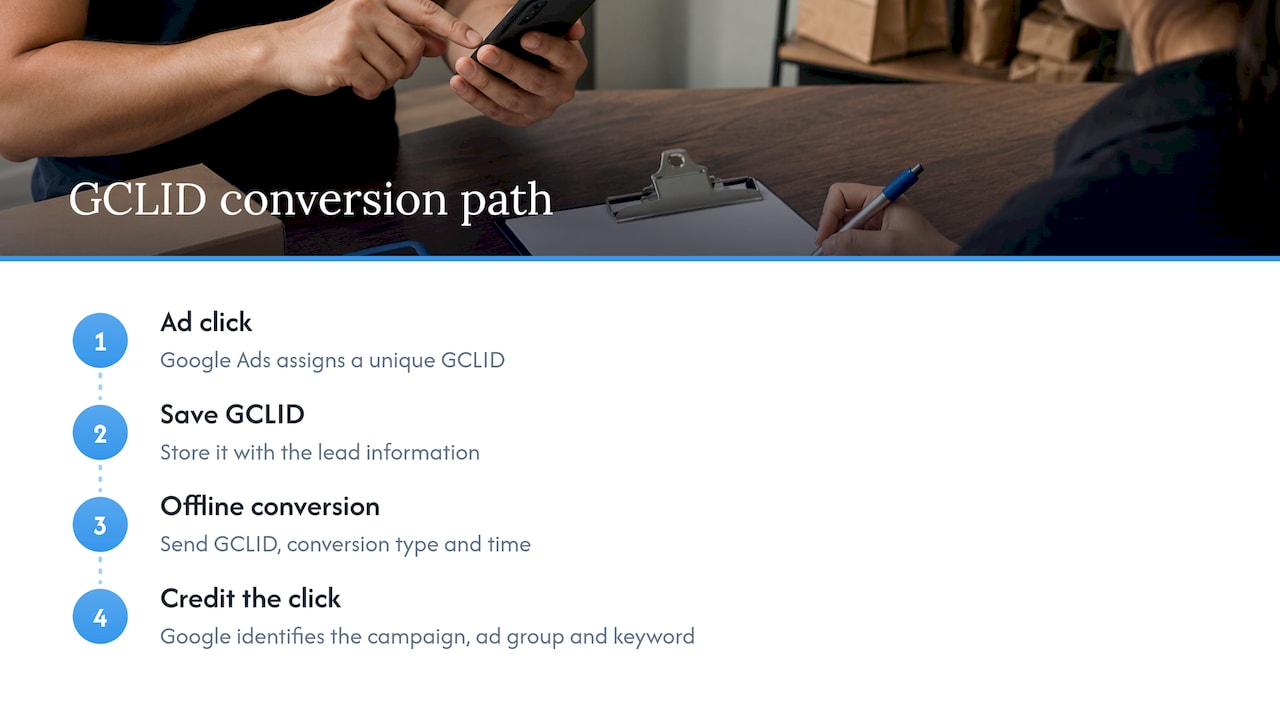
Google Ads assigns a unique GCLID (Google click ID) to each ad click. You save it with the lead information you collect. When that person later converts offline, you send the GCLID back to Google Ads with the conversion type and the time it happened. Google then credits the right click, and therefore the right campaign, ad group and keyword.
The Google Ads API documentation adds that GCLIDs are captured from URL parameters, and that a GBRAID identifier appears when a web click leads to an iOS app. GBRAID is a privacy-preserving identifier that does not link a conversion to an individual user. Google’s guidance is to store it alongside the GCLID in your lead system, which matters for app journeys and for cases where the GCLID might be dropped.
Enhanced conversions for leads
The second route uses customer data you already hold. With enhanced conversions for leads, you send hashed (one-way encrypted) details such as an email address. Google matches them against data collected on your site and against signed-in users who engaged with the ad. Google’s upgrade guide says you can import hashed customer data in addition to GCLIDs, and that you should include GCLIDs whenever possible. The tag collects them automatically when it is in use, but existing GCLIDs should still be imported so conversions are attributed to specific clicks.
The practical point: do not treat these as alternatives. Capture the click ID and collect clean customer data from the same form, and you have two chances to match each outcome.
Setting up offline conversion tracking, step by step
The steps below follow Google’s GCLID setup guide. At each one, we note where projects typically go wrong.
1. Turn on auto-tagging
Auto-tagging appends the GCLID to the landing page URL of every ad click. Without it there is nothing to capture. It is a single account setting, so confirm it is on rather than assuming. One catch: redirects, URL shorteners and some landing page builders strip query parameters. Click a live ad and check that the parameter survives to the final page.
2. Capture the GCLID on your site
You need to be able to make code changes so the parameter is read from the URL when a visitor lands. Google’s guide requires that you can capture the GCLID parameter appended to ad-click URLs. In practice that means a small script that stores the value in a cookie or local storage, and a hidden field in your forms that receives it on submission.
Where it goes wrong: the visitor lands on one page, browses to another, and submits a form on a page where the parameter is no longer in the URL. Storing the value on first landing solves that. Multi-step forms and embedded third-party forms are the other usual culprits.
3. Store it with the lead record
Save each GCLID against the prospect in your CRM or lead tracking system, in a dedicated custom field. Google notes the GCLID is case sensitive, so any process that lowercases, trims or truncates fields will break the match silently. Also store the email address, phone number and the form submission time.
If your CRM is where sales outcomes live, this step is the hinge of the whole system. Our CRM management work covers keeping those fields and stages consistent so the data you send back is reliable.
4. Create the offline conversion action
In Google Ads, create a conversion action for the offline event and connect a data source. Google’s setup guide notes that the measurement setup is not active until a data source is connected, so a conversion action on its own records nothing. Name the action clearly and keep that name identical in every upload, because a mismatch is one of the most common reasons rows are rejected.
Choose the stage deliberately. If your sales cycle is long, importing a closed deal may arrive too late to be useful. A qualified lead or booked appointment gives the platform faster feedback.
5. Connect the data source and import
Google’s guide describes click-to-conversion windows that depend on the source. Direct CRM connections such as Salesforce or HubSpot, and warehouse sources such as BigQuery, work to a 14-day window, while file-based sources such as Google Sheets, cloud storage or SFTP work to a 90-day window. Check your sales cycle against the source you choose before committing to a design.
Whatever the route, each imported row needs a minimum set of data, covered next.
What to record to avoid missing and duplicate imports
Google’s enhanced conversions for leads guidance sets out what an import needs:
| Field | Status | Why it matters |
|---|---|---|
| Email address | Required | Preferred match key: highly unique and not prone to CRM reformatting |
| GCLID or GBRAID | Required | Ties the outcome to a specific click |
| Conversion name | Required | Must match the conversion action exactly |
| Conversion time | Required | Includes time zone; date-only values can be misread |
| Phone number with country code | Recommended | Second match key when the email differs |
| Order ID | Recommended | Controls duplicates |
| Conversion value and currency | Recommended | Lets you optimize for revenue, not just counts |
Formatting before hashing
Hashed matching only works if the input is normalized the way Google expects. Emails should be trimmed and lowercased. Phone numbers should be in international format, so a UK mobile becomes +44 followed by the number without the leading zero. A CRM that stores numbers as 07… or adds stray spaces will lower your match rate without any visible error. Run a sample of your own records through the formatting rules before building the full export.
The usual reasons rows fail
Set up checks for each of these before the first upload:
- Click too old. Google keeps click IDs for a limited period. If your sales cycle is longer, import an earlier stage, such as a qualified lead, instead of the final sale.
- Click too recent. Uploading immediately after creating a conversion action can fail. Allow some hours before the first upload.
- Time zone errors. A conversion time that predates the click, because of a time zone offset, is rejected.
- Name mismatch. The conversion name in the file must match the action in the account.
- Wrong account. The GCLID belongs to the account that served the click.
- Duplicates. Rows with the same click ID, conversion name and time are treated as the same conversion. Two sales from one click need different times or order IDs.
A match rate below what you expect is a diagnosis task, not a verdict. Missing identifiers, invalid formatting, outdated contact details and duplicate records all reduce it, and a higher match rate does not by itself prove that your advertising caused extra sales.
UK privacy and consent: what applies to offline tracking
Offline conversion tracking uses personal data, so it sits within UK GDPR and the Privacy and Electronic Communications Regulations. Three points matter most for advertisers in the UK.
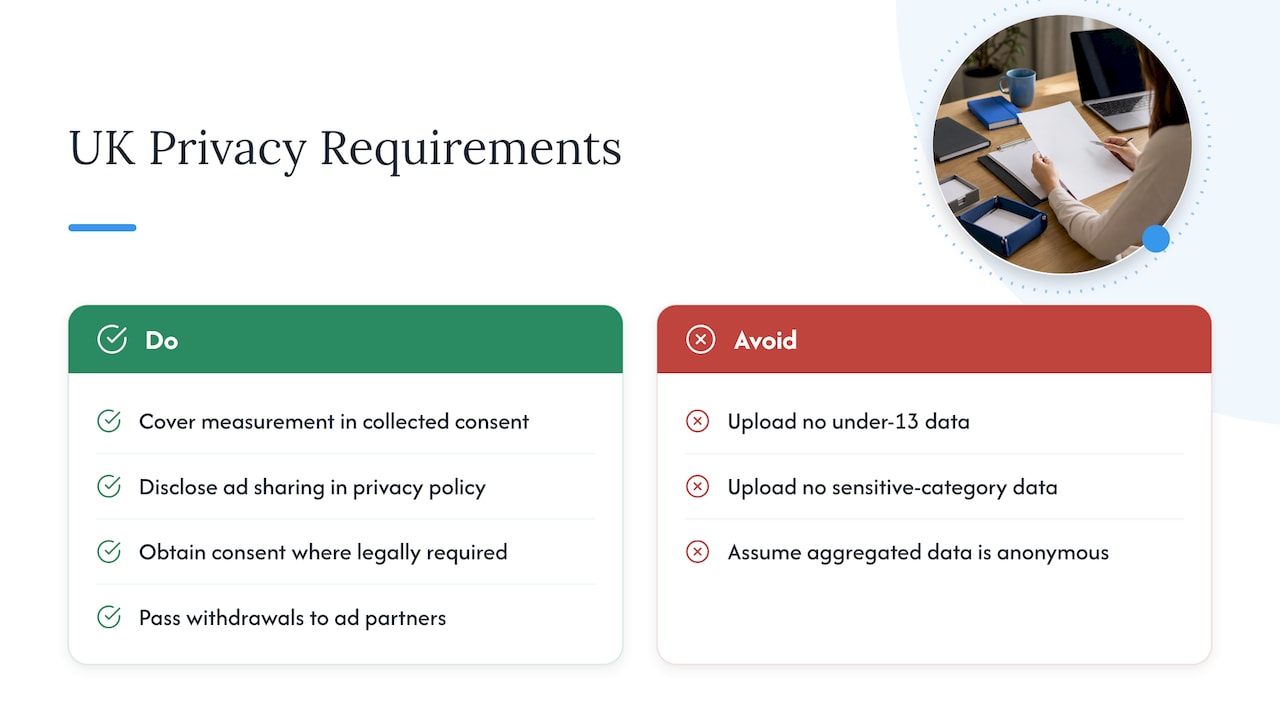
Consent covers the measurement chain. The ICO’s position is that storage and access technologies used for online advertising require consent. Measurement does not need a separate consent, but it must be covered by the consent you collect. That consent should explain the third-party sharing involved, its purpose and how the user controls it. Whoever collects consent is responsible for passing on withdrawals.
Your privacy policy must say it. Google’s customer data policies allow you to upload first-party data, which includes customer information from websites, apps and physical shops, but you must disclose in your privacy policy that you share information with third parties for ad measurement, and obtain consent where the law requires it. Data about individuals under 13 and sensitive-category data must not be uploaded.
Anonymized reporting is a high bar. The ICO’s Meta regulatory sandbox report concluded that in the earlier stages of privacy-preserving attribution a risk of identifiability remains, so UK GDPR and the Data Protection Act 2018 still apply. Aggregated reporting may be effectively anonymous only under strict conditions, with continued identifiability assessments.
The practical consequence is that your consent banner, your tag setup and your CRM data flow need to agree with each other. Our guides on UK cookie consent and Consent Mode V2 explain how to set that up so you do not lose measurable conversions through a misconfigured banner. If your leads also enter email programs, the UK GDPR email marketing guide covers the consent side of that data. For questions about your specific legal position, speak to your data protection officer or a solicitor.
Checking that the chain works
Do not wait for a quarter of data to find a break in the chain. Test it in a day:
- Click one of your own ads, land on the site and submit a test lead.
- Open the CRM record and confirm the full GCLID arrived, with the capitalization intact.
- Move the test record to the stage you want to import and generate the upload.
- Check the import diagnostics in Google Ads for rejections: old or recent clicks, time zone errors, name mismatches, wrong account, duplicates.
- After a few weeks of real data, compare imported conversions with the number of qualifying deals in your CRM. Large gaps point back to a capture, storage or formatting problem.
Then use the results. Report cost per qualified lead or cost per customer by campaign, and let automated bidding optimize against the stage that reflects revenue. Importing outcomes back helps reports identify which campaigns produce customers, and gives Smart Bidding real sales to learn from. For a wider view of tracing pipeline to source, see our guide to B2B lead attribution.
If you are working across web and app journeys, connecting outcomes to Google Ads in the same measurement structure keeps one view of performance across both.
Where server-side tracking fits
Offline imports recover what happens after the lead. Browser-based tags can also lose conversions before the lead is recorded, through blockers and consent choices. Server-side collection reduces that loss, and the two approaches complement each other: one fixes the front of the funnel, the other the back. We cover the first in our server-side tracking guide.
How we approach it
Most offline tracking projects fail at the handoff. The ad platform belongs to one team, the website to another and the CRM to a third, and each assumes the others have captured the click ID. A form field gets renamed, a field gets lowercased, a stage is renamed, and the data quietly stops matching.
This is why we build it as one piece of work. Our team covers strategy, performance marketing, web development and CRM management under one roof, so the GCLID capture, the CRM field, the stage definitions and the campaign structure are designed together. Our approach is built around clarity: one agreed definition of a qualified lead, one place where it is recorded, and one report that shows what each campaign produced.
Our advice is to start with the outcome your sales team already agrees is valuable, trace it back to the click, and only then decide how much of the rest to automate. Simple and consistent beats ambitious and fragile.
Alex
Getting it built
If your sales happen by phone, in a diary system or in a CRM, the gap between ad reports and revenue is a measurement problem that can be fixed. Vertical brings tracking and attribution, CRM management, paid search, paid social and website development together in one integrated team, so the capture, the data and the campaigns are planned together. See the full list of services or talk to us through verticalbrands.co about connecting your sales data to your media.

FAQ
What is offline conversion tracking?
It is the practice of measuring sales, qualified leads and bookings that happen away from your website, such as by phone or in a CRM, and attributing them to the ad click that started the journey. You capture an identifier at the click, store it with the lead, and send the outcome back to the ad platform.
How does Google Ads track offline conversions?
Google Ads gives each click a GCLID. You store it with the lead, then upload it with the conversion name and time when the outcome occurs. Enhanced conversions for leads adds hashed customer data, such as an email address, as a second way to match the outcome to the ad.
How long after the click can I import a conversion?
The window depends on the data source. Google’s guide gives 14 days for some direct CRM and warehouse connections and 90 days for file-based sources. For longer sales cycles, import an earlier milestone such as a qualified lead, and check Google’s current help page for your source.
Do I need consent for offline conversion tracking in the UK?
The ICO says measurement does not need its own separate consent, but it must be covered by the consent you obtain for advertising technologies. Your privacy policy should disclose the sharing with third parties for ad measurement. For your own situation, take advice from your data protection officer or a solicitor.
Which data matters most for matching?
An email address, a GCLID or GBRAID, the conversion name and the conversion time are required. A phone number with country code, an order ID and the conversion value and currency are recommended, and the order ID helps prevent duplicates.
Sources
- About offline conversion imports - Google Ads Help
- Manage offline conversions - Google Ads API
- Set up offline conversions using Google Click ID (GCLID)
- Set up your offline conversions - Google Ads Help
- Your guide to upgrading offline conversion imports - Google Ads Help
- Set up offline conversions using GBRAID - Google Ads Help
- Configure the Google tag for enhanced conversions for leads
- How do the rules apply to online advertising? - ICO
- Report: Meta Platforms, Inc - ICO
- Customer data policies - Google Ads Help