Photo by CHUTTERSNAP on Unsplash
A Shopping listing is only as reliable as the product data behind it. Optimising a Google Shopping feed matters because Google uses feed details to show products across Search and the Shopping tab. Inaccurate prices or stock can create a mismatch with the product page, so prices and availability need to stay aligned wherever shoppers see them.
The operational challenge is that product data changes, and a feed that doesn’t keep pace can undermine the customer journey and campaign performance. Titles, product attributes, landing-page consistency and update frequency all affect how clearly Google can understand and show your products. A reliable update process keeps these elements in step.
This guide explains what affects Shopping performance, how to keep prices and availability accurate, and how to update product data using suitable feed-management methods. It also covers what to consider when your catalogue changes frequently, so listings stay aligned with the products you actually sell.
Key Takeaways
- Clear titles, descriptions and product attributes help Google understand what you sell. AI-assisted optimisation can support this work, but product details still need to match the landing page.
- Shopping performance depends on more than bids. Product data, promotions, delivery and returns information can all influence how listings perform.
- Keep feed prices and stock aligned with your website, including relevant delivery and tax details. Automated updates help reduce mismatches as your catalogue changes.
- Custom labels can organise products around commercial priorities, including margins and campaign performance, so advertising decisions are more structured.
- When catalogue updates become difficult to manage consistently, professional feed management can help keep product data and campaign activity in step.
1. Why is feed optimisation so important?
Google Merchant Center uses product feeds to show items in free listings across Search and the Shopping tab. Each listing relies on structured product data, including its title, description, price, image and availability. Vague or incomplete attributes give Google less context about a product. Clear information helps connect products with relevant searches and present them accurately.
Titles carry important details, but shoppers may not see the whole title in an advert. Put the product type, brand and defining detail near the beginning. Google Shopping titles should put key details within the first 70 characters and remain under 150 characters. For example, “Brand cotton duvet cover, king size, green” communicates more than “Soft bedding”. Keep the title consistent with the product landing page.
Descriptions provide room for supporting detail, with up to 500 characters available. Include factual information that helps distinguish variants, such as fabric, fit or compatibility. AI can help draft titles and descriptions from existing catalogue information, then identify possible attributes from product copy. It should not invent specifications. A specialist can compare suggested details against the product record and landing page before applying changes. Titles and descriptions needs review when source data is incomplete.
Attribute completeness matters, too. Add relevant fields such as colour, size, material, pattern and age group where they apply. For Apparel & Accessories in the UK, colour is a required attribute. Google recommends using the same colour name in product data and on the landing page. If a feed says “navy” but the page describes the item as “black”, the mismatch can confuse shoppers and risk disapproval. Variant images and landing pages should match the product listed.
Google Merchant Center applies rules to individual attributes as well as the feed overall. Use a unique product ID and title for each item, and keep the ID stable when updating its details. Choose the most specific relevant Google product category, and ensure the submitted information reflects the actual product. AI-assisted extraction can flag missing fields across a catalogue, but rules-based review still matters. Incorrect colour, size or material values can undermine listing accuracy.
Merchant Center’s data requirements also evolve. Google added product-level shipping attributes handling_cutoff_time, minimum_order_value and loyalty on April 14, 2026. Google set August 18, 2026 as the sunset date for the Content API for Shopping, with a full shutdown planned for early 2027. Feed processes that depend on the API need a migration plan. Accurate attributes and a supported update method keep commerce data structured, consistent and ready for listings.
2. Factors affecting Google Shopping performance
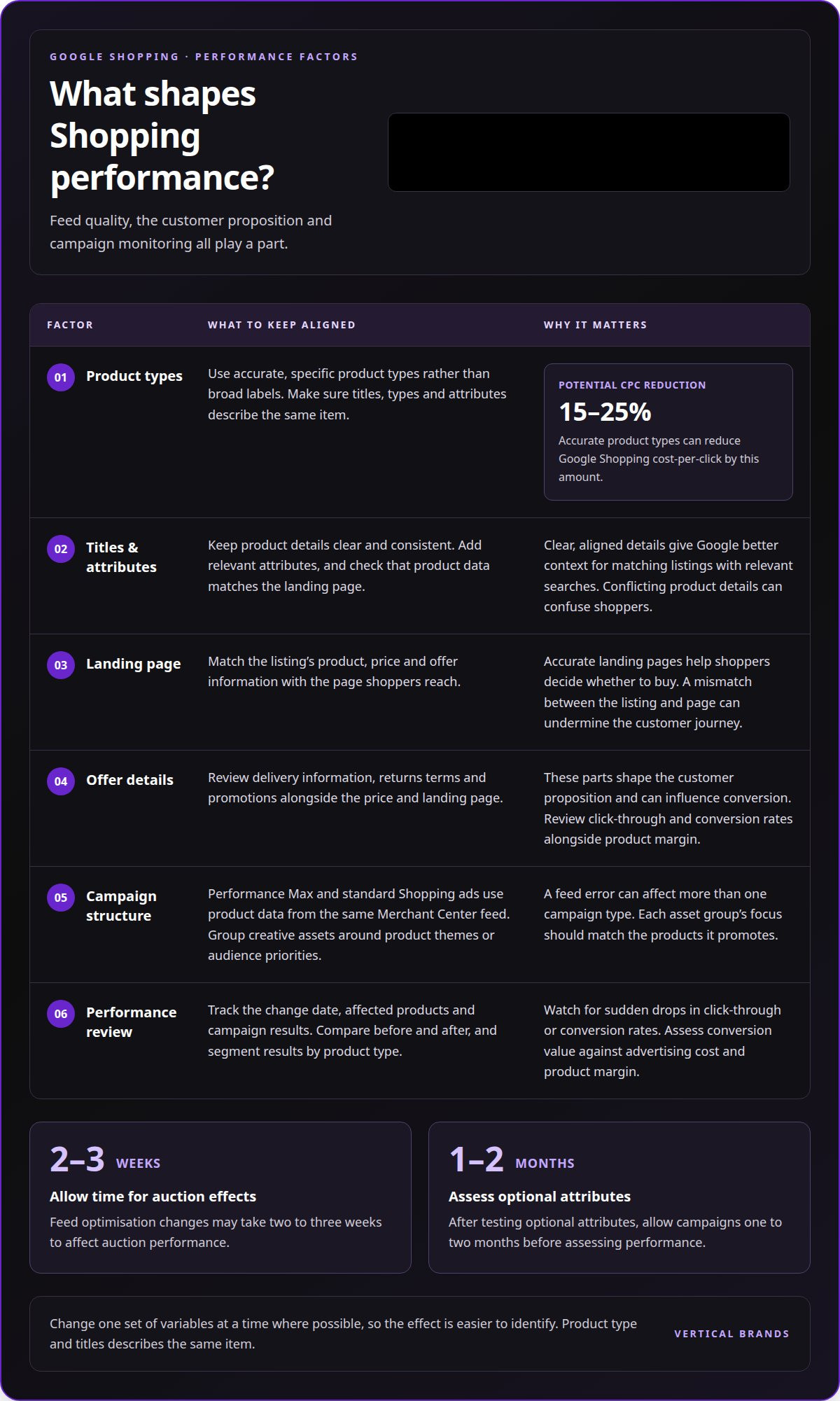
How do feed optimisation changes affect Shopping campaign performance and conversion rates? Better-aligned product details can help Google match listings with relevant searches, while accurate landing pages help shoppers decide whether to buy. Optimising a Google Shopping feed can improve the match between products shown and the searches they appear against. Changes may take two to three weeks to affect auction performance, so assess results over time rather than judging an edit immediately.
Product types are one factor. Accurate product types can reduce Google Shopping cost-per-click by 15–25%. They give Google more specific context than broad labels, helping distinguish products with different uses. Titles, product types and attributes should describe the same item, not contradict each other. For example, a waterproof walking jacket needs a product type that reflects its category, rather than a broad label such as “clothing”.
Delivery, returns and promotions also shape the customer proposition. A product may attract clicks but convert poorly if delivery details or return terms create friction. Merchant promotions can affect conversion rates, while prices and landing-page information need to support the offer shown in the listing. Review click-through and conversion rates alongside product margin, rather than treating traffic volume as the only measure of success.
Performance Max uses product data from the same Google Merchant Center feed as standard Shopping ads, so a feed error can affect more than one campaign type. Asset groups organise creative assets around product themes or audience priorities, while the feed supplies eligible products. Clear grouping helps teams understand which product categories and creative combinations support campaign objectives. Each group’s focus should match the products it promotes.
Professional monitoring connects feed changes with business outcomes. A specialist can compare performance before and after updates, segment results by product type, and watch for sudden drops in click-through or conversion rates. They can assess conversion value against advertising cost and product margin. This helps distinguish a weak listing from limited product demand or an offer that struggles to convert. Optimising a Google Shopping feed also means tracking what changed, which products were affected and how results shifted.
After testing optional attributes, allow Shopping campaigns one to two months before assessing performance. This gives updated product information time to influence delivery and creates a more useful comparison. Record the change date, affected products and campaign results. If several variables change at once, it becomes harder to identify what drove the result. Coordinated search engine optimisation and paid activity can help teams interpret performance across channels, with each channel assessed against its own role and objectives.
3. Availability and pricing accuracy
How do Google Shopping feed requirements differ for pricing, availability, delivery and returns in the UK? Price and availability data should match the product page, with delivery and tax information kept current. Regional targeting also requires consistent inventory and landing-page details for each area.
Price errors create a direct mismatch between a Shopping listing and the checkout journey. Compare feed prices with the current product page, including sale prices and the correct product version. If a promotion ends but the feed still shows a discount, shoppers can see conflicting information. Update price and stock data regularly when the ecommerce catalogue changes.
Availability must reflect sellable stock, not simply whether a product record exists. A listing marked in stock can disappoint shoppers if their selected size or colour has sold out. Align availability with the relevant variant and its landing page, then account for stock changes in the feed schedule. Products with only two or three units in stock may warrant exclusion from advertising, reducing the risk of spending against limited inventory.
Regional availability requires more than a location setting. Merchants need regions and regional inventory configured, with landing pages showing the price and stock status that apply to each region. For example, if a product is available in one UK area but not another, the feed and page shown to each audience should reflect that difference. Delivery details should also match the offer presented to shoppers.
Returns information affects shoppers’ confidence before purchase. Google considers shipping speed, return policies, website quality and positive reviews when determining eligibility for a Top Quality Store badge. Accurate delivery and returns details support a consistent customer experience, but they cannot compensate for a mismatch in feed price or availability.
GTINs help identify products precisely. A specialist checks whether each product has a valid GTIN in the source catalogue, then compares it with manufacturer or product packaging information before adding it to the feed. The identifier must match the exact product and version, not a similar model or a different pack size. Some older books, including titles printed before ISBNs became mandatory in 1970, may not have GTINs.
Promotional pricing needs the same control. Opensend reports that discounts of 10–25% can improve conversion rates by 25–35%, but the displayed offer must still match the landing page. Feed updates should reflect the promotion’s start and end, the product titles should identify the right item, and images should show the advertised version. This alignment makes regional targeting and campaign measurement more dependable.
4. How to update product data?
A specialist structures product categories, product types and custom labels around the catalogue and campaign objectives. Google product categories should be selected at least 2-3 levels deep, while product types describe the merchant’s own category hierarchy. The specialist then maps each item to the correct values, checking that product listings and descriptions reflect the same product.
Custom labels create a separate layer for campaign segmentation. Google Shopping feeds can contain five custom labels, from custom_label_0 through custom_label_4. A specialist can use them to group products by margin, season, stock priority or performance. For example, one label might distinguish high-margin products, while another groups seasonal lines. The labels give campaigns useful structure without changing the customer-facing product title.
Margin and CPA, or cost per acquisition, help shape product groupings. Use the merchant’s commercial data to identify products that support different bidding priorities. Higher-margin items may tolerate a different acquisition cost from lower-margin products. Labels make those distinctions easier to apply consistently across campaigns. They should reflect current business priorities, not become fixed categories that no longer match the catalogue.
Campaign segmentation works best when each label has a clear purpose. For example, reserve one field for margin bands, another for seasonal relevance, and another for performance groups. Remaining fields can support operational priorities, such as stock status or product launches. With five available fields, every label should inform a decision. Overlapping labels add complexity without improving campaign control.
Updates should also account for the customer journey. A shopper discovering a product may need clear descriptions and relevant attributes; someone comparing options needs accurate variants and product details. A specialist can align feed groups with these different commercial roles, then assess whether the listings support discovery, consideration or conversion. For example, a new product could be tracked separately from proven bestsellers, making performance easier to interpret.
Changes need a controlled rollout. Product title changes can show results within 3-7 days, so a specialist can monitor the affected listings before expanding a wider update. They can record which products changed, when the feed was updated and how campaign results shifted. This creates a clearer link between intervention and outcome. Updating several unrelated fields together makes it harder to identify which change mattered.
Review descriptions and custom labels as the catalogue changes. A seasonal label left in place after a promotion ends can distort segmentation; a product type that no longer fits can misclassify listings. Schedule reviews around catalogue changes and campaign planning. Labels give the feed a practical structure, while accurate product data keeps each campaign group tied to the right products.
5. Shopping feed management tools
A feed tool can automate routine updates, but software alone doesn’t decide which products deserve attention. Google Merchant Center flags product issues; a specialist interprets them, prioritises corrections and checks whether changes support commercial goals. Effective feed management combines reliable updates with clear ownership of product data, campaign structure and reporting.
Start by assessing the update process. Google recommends keeping price and availability current through automated feed delivery, the Merchant API or structured data markup. Daily feed updates can help prevent mismatches, warnings and account suspensions when product information changes. A specialist should explain how updates are scheduled, how errors reach the team and how corrected data is resubmitted.
Next, look for quality controls, not just a dashboard. Google Merchant Center reports disapprovals and missing attributes, while a management process should identify their cause and prevent recurrence. The guide recommends targeting a product approval rate of 98% or higher and keeping weekly disapprovals below 2%. Those measures are useful alongside a record of affected products, fixes and subsequent approval status.
Performance reporting should connect feed changes with clicks, conversions and commercial value. Segment results by product category, campaign or custom label, then compare them with the change history. For example, assess a title update against the products changed, their listing performance and resulting conversions. Reporting only total clicks can conceal whether additional traffic contributes to sales.
Ask how the service handles catalogue scale and priorities. Manual optimisation for stores with more than 1,000 products can require 20–40 hours of work per week. Automation can accelerate repetitive tasks, such as applying consistent rules across product titles, but exceptions still need human review. A useful workflow makes responsibilities clear for product data, approvals and campaign decisions.
Adapt feed management to your business. Seasonal products, changing stock and differing margins need different priorities. A specialist should explain how product groups are selected, how changes are tested and how results are reported. Clear documentation matters: without a change log, it becomes harder to trace a sudden performance shift to a feed update, campaign adjustment or catalogue change.
Choose a service that makes its process visible: scheduled updates, issue resolution, change records and performance analysis. The tool should support decisions, not replace them. If you need a clearer view of how customer records inform campaign planning, discuss your CRM and campaign priorities.
Vertical Brands
Vertical Brands helps businesses connect digital growth activity with clear commercial priorities. When Shopping feed accuracy is part of a wider acquisition challenge, Paid Search and Paid Social can support related campaign activity. Klaviyo Email Marketing and Email Marketing & CRM Management can help businesses engage customers beyond the product listing.
The right next step depends on where the friction sits: product information, campaign performance or customer retention. Vertical Brands can shape relevant marketing activity around those priorities. Clear goals and reliable product data make that work more focused.
Contact Vertical Brands to discuss your growth priorities.
Build a feed process that keeps pace
Product catalogues, trading priorities and campaign structures change. Treat optimising a Google Shopping feed as an ongoing operational discipline, not a one-off clean-up. Assign ownership for product data, define how updates are reviewed, and record decisions so future changes have a clear reference point. A consistent process helps teams respond as the business evolves.
The next opportunity is to connect feed management with wider growth priorities. A listing is one part of the customer journey, and its role depends on what the business needs to achieve. Vertical Brands can help identify where digital marketing activity should focus and how it can support those commercial priorities. Clear ownership and shared objectives keep teams aligned as plans develop.
If you’re ready to make your growth activity more connected, contact Vertical Brands to discuss your priorities. A focused next step can turn better data management into a stronger foundation for ongoing growth.
Frequently Asked Questions
Why is feed optimisation so important?
A well-structured feed helps product listings communicate the right details to shoppers and Google, and makes catalogue changes across product variants easier to manage. For example, if a retailer adds a new size, the corresponding listing needs the correct variant details, image and landing page. Otherwise, shoppers may reach a page that doesn’t match their selection. Feed quality supports a more consistent journey from discovery to product page.
How does a specialist get your feed ready for BFCM and shopping season?
Before Black Friday and Cyber Monday, group priority products by promotion, stock position and commercial importance. Review planned offers, product eligibility and update schedules, then check that campaign listings match the relevant landing pages. Daily feed updates can help keep product information aligned during busy trading periods. Track issues as they arise, so changes to a promotion or product variant appear in the right listings.
How does a specialist measure what’s working?
A specialist compares results across product groups and campaign periods, then connects clicks with conversions and conversion value. They also consider whether a product’s performance supports its commercial role, rather than judging success by traffic alone. For example, a product may attract fewer clicks but contribute more value per order. Recording when changes were made helps distinguish feed effects from other campaign adjustments and gives teams a clearer basis for future decisions.
How does a specialist update product data?
Update the product source data or feed rules, then check that submitted records match the catalogue. Review a sample of variants after a change, such as confirming that a new shoe size has the right identifier and landing-page details. Record affected products and updates in a change log. This makes later troubleshooting more precise, especially when several catalogue changes happen close together.
How does a specialist optimise product titles and descriptions for Google Shopping?
Structure titles around the details shoppers use to distinguish products, such as product type, brand and variant. For example, a title for a specific colour and size should make those differences clear without adding unsupported claims. Descriptions can provide relevant context, such as material or compatibility. Keep both fields consistent with the product page, so shoppers see the same item and specifications after clicking.
Which product attributes and identifiers does a specialist include in a Google Shopping feed?
The fields depend on the product category and its available information. Apparel listings may need colour, alongside relevant details such as size, material, pattern and age group. Product identifiers can include a GTIN, brand and manufacturer part number, or MPN. A specialist maps these to the correct item and variant, rather than copying one product’s details across a whole range. Stable product IDs also help maintain continuity when records are updated.
How do GTIN, brand and MPN affect product visibility and performance, and how does a specialist check them?
These identifiers help distinguish a product from similar items in a catalogue. Retailers that add correct GTINs to product data have seen an average 20% increase in clicks. A specialist matches the GTIN, brand and MPN against the relevant product or manufacturer information, then checks that each value belongs to the exact item and variant. An incorrect identifier can misrepresent the product, so unsupported or mismatched values shouldn’t be added.
How does a specialist optimise product images for Google Shopping?
A specialist checks that each image shows the same product variant as its listing, including its colour and material. Google recommends providing the highest-resolution product image available, with images around 1500 x 1500 pixels recommended. Google will enforce a minimum image size of 500 x 500 pixels from January 31, 2027. The specialist can also review image links and confirm that the selected image represents the product clearly on its landing page.