Photo by Ibrahim Abazid on Unsplash
The highest-volume keyword isn’t automatically the right one for your brand. A useful e-commerce keyword research guide starts with relevance: the phrase should reflect what you sell, how customers describe it and what they intend to do next.
Search volume helps compare opportunities, but it doesn’t show whether a term fits your products or will attract the right audience. Effective research considers customer language, business priorities and the pages already appearing in search results, not just a list of popular phrases.
This guide explains how to build a relevant keyword set, choose a primary term for each page and assess search intent alongside competition. It also shows how customer feedback, product information and competitor rankings can inform your research. Strong keyword choices reflect what your business can offer and what your pages can deliver, giving you a clearer basis for deciding which opportunities deserve attention.
Key Takeaways
- Prioritise search terms that match your products and customers’ needs, not volume alone.
- Use customer conversations and business data to uncover the language people use when considering a purchase.
- Match each page’s primary keyword to its purpose and the type of result searchers expect.
- Assess keyword opportunities against intent, competition and your brand’s ability to meet the need.
- Use competitor rankings to identify gaps and shape a focused strategy. The strongest opportunities is those your pages can serve clearly.
Why does your keyword research process matter?
A professional e-commerce keyword research guide brings together customer language, product information, search data and live results. It identifies terms that fit your catalogue, reveals search intent and helps determine which page type can meet each need. The guide is most useful when it connects these signals to business priorities rather than treating search volume as the only measure of opportunity.
- Set the commercial scope. Map product categories, ranges and business priorities before collecting phrases. For a skincare retailer, facial cleansers might be separated from moisturisers, then grouped by ingredients, skin concerns and formats. These groups give you focused starting points for research and keep your target list relevant to products you sell, rather than broad phrases with little commercial fit.
- Capture customer wording. Reviews, product questions, support tickets, live chats, emails, social comments and customer calls show how shoppers describe their needs. For example, customers may ask whether a cleanser is fragrance-free or suitable for sensitive skin. Record recurring phrases, connect them to relevant products and questions, then compare them with the language used in search results.
- Expand ideas with research tools. Google autocomplete, People Also Ask and Related Searches can surface related queries. Google Search Console shows queries already bringing visibility to a website, whilst Google Ads Keyword Planner supports demand research. Specialist SEO platforms can provide estimates for search volume and keyword difficulty. Scores commonly range from 0% to 100%, but help compare opportunities within a tool, not decide priorities alone.
- Choose tools and filters for the decision. Select tools based on the research task, catalogue and available data. Filters for the United Kingdom, language, intent, volume and difficulty can narrow a large export. An informational search may suit a buying guide, while a transactional query may fit a product page. Volume estimates indicate demand, not relevance, ranking feasibility or conversion value.
- Validate UK language and timing. UK research accounts for local wording and spelling, such as “trainers” rather than “sneakers”, when customer usage supports that distinction. Use regional terms in targeting only where the business serves those areas and can provide useful information. Compare seasonal queries with the retailer’s own search and sales patterns, including Christmas or Black Friday. The strongest signals are where language, demand and commercial fit align.
Building seed lists from customer and business data
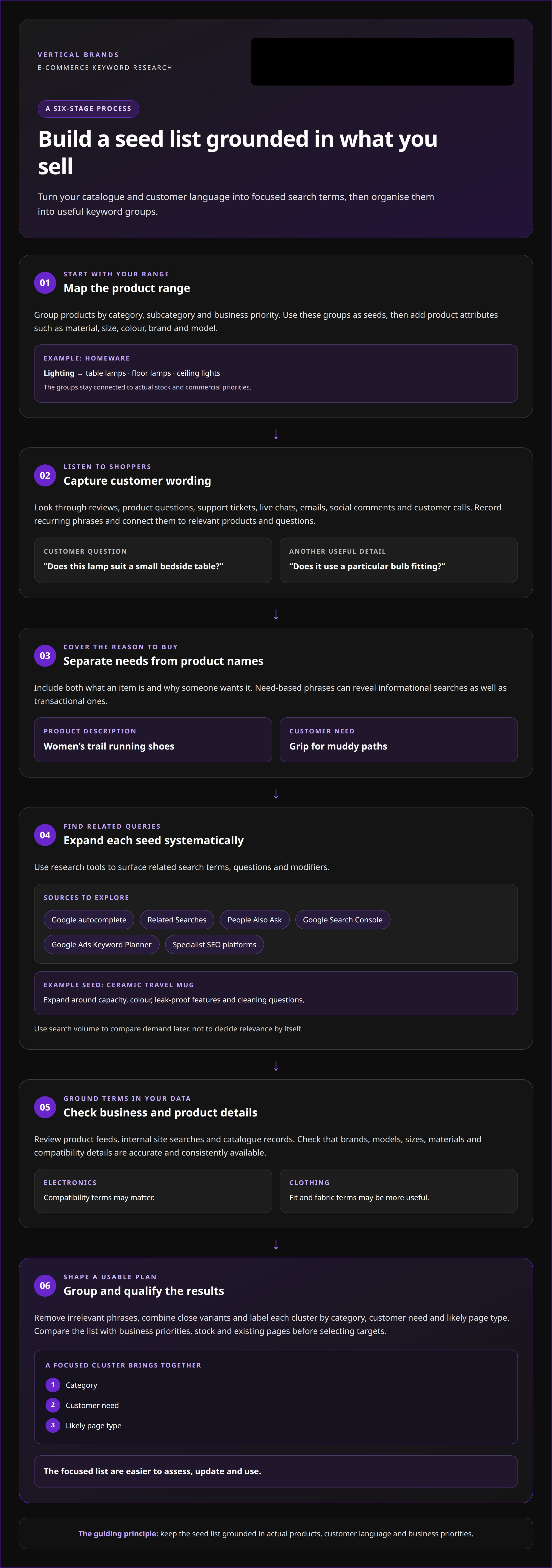
A useful seed list starts with your catalogue and the language customers already use. Turn these inputs into focused search terms, then expand and organise them before assessing search volume or page opportunities.
- Map the product range. Group products by category, subcategory and business priority. For a homeware retailer, “lighting” might split into table lamps, floor lamps and ceiling lights. Each category becomes a seed, then product attributes such as material, size, colour, brand and model add useful detail. This structure keeps the list connected to actual stock and commercial priorities.
- Extract customer language. Reviews, product questions, support tickets, live chats, emails, social comments and customer calls show how shoppers describe their needs. For example, customers might ask whether a lamp suits a small bedside table or uses a particular bulb fitting. Record recurring phrases and connect each to relevant products, questions and potential search intent.
- Separate needs from product names. A seed list should cover both what an item is and why someone wants it. For running shoes, “women’s trail running shoes” describes a product, while “grip for muddy paths” signals a need. These wording patterns help identify informational searches alongside transactional ones, without assuming every phrase belongs on a product page.
- Expand each seed systematically. A keyword tool can suggest related search terms, questions and modifiers. You can also use Google autocomplete, Related Searches, People Also Ask, Google Search Console and Google Ads Keyword Planner. For “ceramic travel mug”, expansions might include capacity, colour, leak-proof features or cleaning questions. Use search volume to compare demand later, not to decide relevance by itself.
- Check business and product data. Product feeds, internal site searches and catalogue records can reveal attributes customers use to narrow their choices. Check that brands, models, sizes, materials and compatibility details are accurate and consistently available. For electronics, “compatible with” searches may matter; for clothing, fit and fabric terms may be more useful. Keep the seed list grounded in the actual assortment.
- Group and qualify the results. Professionals remove irrelevant phrases, combine close variants and label each cluster by category, customer need and likely page type. They compare the list with the retailer’s priorities, stock and existing pages before selecting targets. A focused ecommerce SEO strategy can turn those clusters into a clearer plan. That makes the list easier to assess, update and use.
What Makes a Good Keyword for Your Ecommerce Brand?
A professional assesses each term against relevance, intent and the page that can satisfy it. The steps below turn keyword data into a practical map for product pages, categories and campaigns.
-
Professional Assessment of Keyword Metrics and Intent
Compare search volume, keyword difficulty and search intent for each candidate. Volume estimates indicate demand, whilst difficulty scores, commonly ranging from 0% to 100%, help compare competition within the same tool. Neither metric proves a term will attract buyers. Professionals inspect live search results to see whether Google favours product pages, categories or informational guides.
For example, “buy linen duvet cover” signals transactional intent, while “how to wash linen” is informational. Match the first phrase to a relevant product or category page and consider a guide for the second. This prevents high-volume terms becoming targets when their intent doesn’t fit the page.
-
How Professionals Prioritise Keywords for Pages and Campaigns
Rank opportunities by product relevance, likely conversions, current visibility, competition and implementation effort. A term with modest volume may be more valuable than a broad phrase if it closely matches an available product. The strongest opportunities align customer intent with commercial fit, so your business can meet the need.
Record each important query’s primary intent against a URL to create a query-to-URL map. Then distinguish organic targets from paid-search campaign terms, where match types, negative keywords, costs and conversion evidence inform planning. For Google Shopping and product listings, use relevant customer wording in accurate product titles and descriptions, including meaningful attributes such as material, size or model.
Product pages should target a specific item and its distinguishing attributes. Category pages should represent the broader range, such as “linen duvet covers”, rather than compete with individual product URLs. Review traffic and conversion data alongside each page’s purpose, so one metric doesn’t dictate the entire priority order.
-
How Professionals Avoid Keyword Cannibalisation
Audit existing URLs before assigning new targets. Cannibalisation can occur when several pages pursue the same search need, such as separate category pages for “linen duvet covers” and “linen bedding” with nearly identical products. Professionals compare page content and search results, then group closely related queries around one useful page instead of creating near-duplicates.
A query-to-URL map makes overlap visible and supports deliberate internal links between related pages. Avoid choosing a keyword solely because it has high volume, repeating variations unnaturally or creating a page without distinct value. When two URLs serve genuinely different needs, give each a clear purpose, content focus and internal linking role.
How does a professional choose a primary keyword?
Find product, category and long-tail keywords by combining catalogue data, customer wording and search results. Select a primary term that reflects each page’s purpose and matches the result type searchers expect.
-
Choosing Realistic Short-Tail Keywords for an Online Shop
Start by assessing broad phrases against the shop’s products, category structure and current visibility. Short-tail keywords often contain one or two words, such as “coffee maker” or “running shoes”. Their broad meaning can attract varied searches, so a professional checks the search results before assigning one to a page.
For a shop selling coffee machines, “coffee maker” might suit a broad category, but it may be too wide for an individual product page. Check whether the shop carries enough relevant products and whether ranking pages match that category-level purpose. Search volume alone can’t show whether a phrase is realistic.
Compare difficulty with your site’s existing authority, relevant content and ability to meet the search need. A broad term with strong competition may not be the best immediate target. Account for implementation effort and whether the page can offer something distinct. A realistic choice is relevant, properly supported and aligned with the page’s role.
-
Selecting Specific Long-Tail Phrases
Build longer phrases from the product, its attributes and the shopper’s intended use. For example, “women’s waterproof trail running shoes” is more specific than “running shoes”. Long-tail keywords are generally more targeted, less competitive and lower in search volume. Assess whether the phrase describes an item you sell and a need your page can satisfy.
For a category page, a phrase such as “ceramic coffee mugs” may fit a range. An individual product page could target a distinctive combination, such as a handmade ceramic mug in a particular colour, if the product and page support that detail. Three to five-word extra-tail terms can make the intended product or need clearer.
Professionals review live search results to confirm whether searchers expect a product page, category page or guide. They also check that long-tail phrases are natural, accurate and useful in titles, descriptions and page copy. Minor wording variations don’t each need separate pages. The best candidates is those that accurately represent the product and give the page a clear focus.
Competitor domain and keyword analysis
Competitor analysis compares ranking queries, page types and authority signals. Use the findings to identify practical opportunities, rather than copying another retailer’s keywords.
-
How Professionals Find Competitor Keyword Gaps
Identify competing websites that appear for the same products and customer needs. Compare their ranking keywords with your pages, then group missing queries by category, product and intent. For example, if a competitor ranks for “wide fit walking boots” and your shop sells suitable boots, that phrase may merit further analysis.
Assess domain authority, page authority, backlinks and anchor texts alongside the keyword gap. These measures help explain a competitor’s search visibility, but don’t prove a query is commercially relevant. Search Console adds your own queries and visibility data. It reports searches where your site has already appeared, so it can’t reveal every unclaimed opportunity.
-
How Professionals Review Search Results and Competitors
Inspect Google search results for each priority query before recommending action. Live results show which page types search engines currently rank, offering stronger evidence of intent than a label alone. For “oak dining table”, professionals examine whether results favour product listings, category pages or buying guides, then compare those formats with the shop’s available pages.
Review competitor pages for useful details, including product attributes, category structure, internal links and content depth. Note where a page directly answers the query and where your shop could provide a distinct, useful alternative. A competitor’s ranking doesn’t prove its approach will work elsewhere. Search results differ by query and should inform analysis, not dictate imitation.
- Separate a genuine gap from a poor fit. Compare each uncovered query with your catalogue, stock and customer priorities. A competitor may rank for “leather office chair”, but that phrase is irrelevant to a retailer selling fabric seating. Conversely, an accurate query about a product attribute could reveal an opportunity for a dedicated page or clearer product information. Competition is only one part of the decision.
Check whether your retailer already receives impressions or clicks for related queries in Search Console. If an existing page appears for a relevant phrase, improving it may be more appropriate than creating another URL. Check search results and page intent before assigning a target, avoiding duplicate pages that divide focus.
- Turn findings into a prioritised action plan. Record each opportunity with its query, competing URL, relevant retailer page and recommended next action. For example, a missing category term may call for stronger category content, while a product-specific query may need clearer product details. Rank opportunities by business fit, search intent, competition and implementation effort, then connect each action to a measurable page objective.
Use professional competitor-led SEO support to translate domain and keyword analysis into focused optimisation priorities. The strongest action is not copying a rival, but building a page that serves a relevant query more clearly. Some competitor gaps are not worth pursuing, and the analysis should make that distinction clear.
Vertical Brands
Vertical Brands helps e-commerce businesses connect keyword priorities with a wider growth strategy. Turn research into a practical plan by identifying which pages need attention, where paid search could support relevant queries, and how to assess performance alongside customer and business priorities.
This is a useful next step when internal teams lack the time or specialist capacity to translate keyword findings into coordinated action. Keep the focus on commercial relevance: select work that fits the catalogue, customer intent and wider marketing activity, rather than pursuing search volume alone. Clear priorities make implementation more straightforward.
Contact Vertical Brands to discuss how keyword research can support your e-commerce growth priorities.
Turn your keyword decisions into a growth plan
The next step is to connect search priorities with the wider customer journey. An e-commerce keyword research guide is most useful when its findings inform decisions across acquisition, conversion and retention, rather than sitting in a spreadsheet without an owner.
Vertical Brands can help translate SEO priorities into a wider digital growth approach. Alongside Search Engine Optimisation, its services include Paid Social, Klaviyo Email Marketing and Email Marketing & CRM Management. These channels support different stages of customer engagement, while the right mix depends on your business objectives and existing strategy.
Bring your product priorities, customer insights and key business goals into your next planning conversation with Vertical Brands. A focused discussion can clarify which opportunities deserve attention and how SEO fits alongside your other marketing activity. You don’t need every decision resolved before taking that step. Start with the challenge you want to address, then build a practical direction from there.
Contact Vertical Brands to discuss your SEO and take the next step towards a more focused growth plan.
Frequently Asked Questions
Is search volume the most important metric?
No. Search volume estimates demand, but it doesn’t show whether a query matches your products, page or commercial priorities. A lower-volume phrase such as “replacement filter for compact air purifier” may be more relevant than “air purifier”. Compare volume with intent, ranking difficulty, current visibility and the page’s ability to meet the need. The strongest opportunities fit both customer demand and your offer.
What is Keyword Score?
“Keyword Score” doesn’t have one universal definition across research tools. A platform may use the label for a combined assessment of factors such as estimated demand, competition or relevance. Check what the specific tool includes before comparing scores. A high score in one platform may not mean the same thing in another, so treat it as a sorting aid, not a ranking forecast.
What is the difference between keyword research and keyword analysis?
Keyword research gathers potential search queries; keyword analysis evaluates which ones merit action. For example, research might produce phrases about reusable water bottles, including size, material and cleaning questions. Analysis then assesses their relevance, intent, search demand, competition and suitable page type. The distinction matters because a large list alone doesn’t tell a retailer which terms to prioritise or where to use them.
Why is Keyword Research for E-Commerce Important?
It helps online retailers understand how shoppers describe products and what information they need before buying. That insight can shape category names, product descriptions and buying content. For example, searches about choosing a carry-on suitcase may signal a need for a comparison guide, while a model-specific query may suit a product page. Without research, site language can miss the terms customers use to find relevant products.
How much do popular SEO keyword research tools cost in the UK, and what affects the cost of professional research?
Tool pricing varies by provider, plan and included features, so compare current UK plans directly rather than relying on a single headline figure. Professional research costs depend on the project scope, catalogue complexity, number of pages and analysis required. The price depends on the case and is given after a quote request. A tightly defined set of priority categories requires a different workload from a full-site review.
How does a professional map keywords to product pages, category pages and buying guides?
Match each query group to the page type that best serves its purpose. Product-specific searches can map to relevant item pages; broader range searches may suit categories; comparison or care questions can inform buying guides. Record each page’s main query and intent, then flag overlap for review. For example, a guide about choosing a coffee machine should support, not duplicate, a product category.
Best keyword research tools for e-commerce in the UK compared
Google Search Console shows queries already bringing your site visibility, while Google Ads Keyword Planner supports demand research. Autocomplete, People Also Ask and Related Searches help find ideas; specialist SEO platforms estimate search volume and difficulty. Compare results using UK language, product relevance and live search results, not volume alone.