Photo by Siora Photography on Unsplash
A sign-up isn’t the same as a confirmed subscription. Klaviyo double opt-in best practices start with a clear rule: a new subscriber confirms their intent before joining a list. For email, that usually means clicking a confirmation link; for SMS, completing the confirmation step. Single opt-in adds subscribers straight away, except when an SMS form uses Smart Opt-in.
That extra step can keep mistyped details and automated sign-ups off your lists. It also adds friction, so the choice affects both list growth and contact quality. The distinction matters most when you manage email and promotional SMS together, because each channel has its own opt-in behaviour.
This guide explains how double opt-in works in Klaviyo, how it differs between email and SMS, and what changes with single opt-in. You’ll learn how confirmation affects list membership and welcome messages, along with the settings and exceptions to consider when configuring lists. The aim is a consent process that’s clear, consistent and suited to your acquisition strategy.
Key Takeaways
- Understand when email and SMS subscribers need to confirm, including the distinction between promotional and transactional SMS consent.
- See how confirmation helps keep mistyped details and automated sign-ups off your marketing lists.
- Learn how Klaviyo handles list membership, confirmation messages and welcome series entry.
- Compare the extra confirmation step with single opt-in, and understand the trade-off between list growth and contact quality.
- Find out how tailored confirmation emails and landing pages can make the sign-up process clearer and more consistent.
How double opt-in works for email and SMS lists
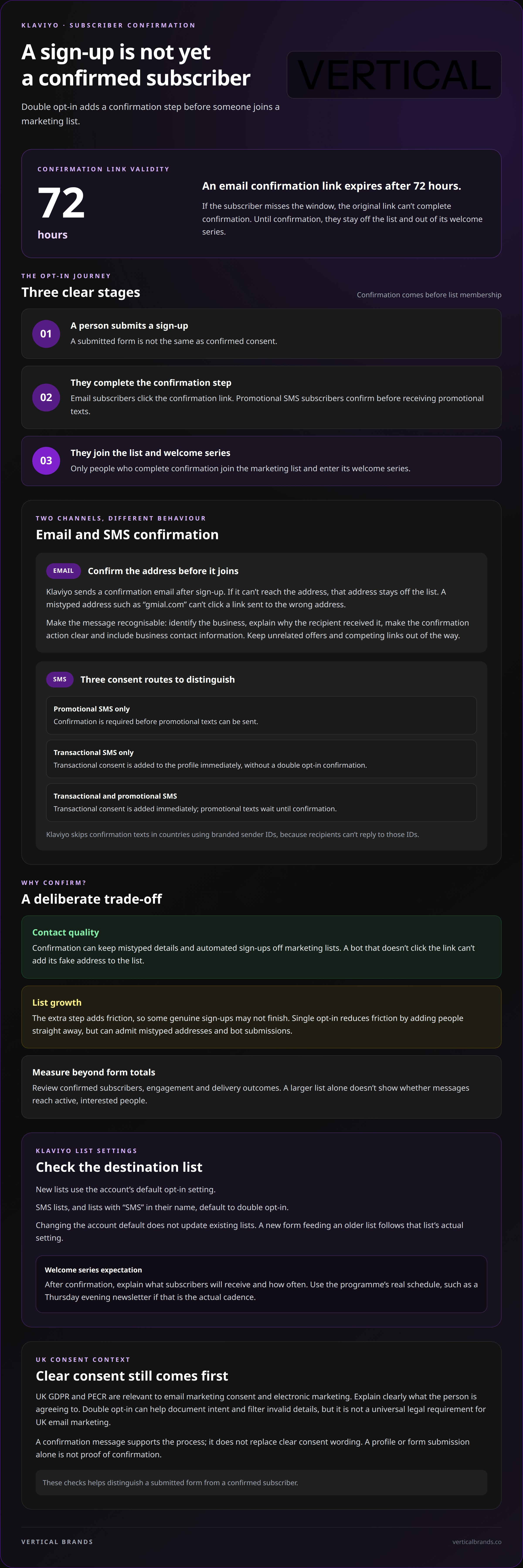
Double opt-in adds a confirmation step after sign-up. Only people who complete it join the marketing list and enter its welcome series.
-
Prevent mistyped email addresses
Keep the confirmation step in place for email sign-ups. Klaviyo sends a confirmation email after someone subscribes, and the address stays off the list if the message can’t reach it. This helps prevent mistyped addresses from becoming active subscribers. For example, if someone enters “gmial.com” instead of “gmail.com”, they can’t click a link sent to the incorrect address. Don’t treat a submitted form as confirmed consent.
-
Improve confirmation email completion
Make the confirmation email recognisable and its next action unmistakable. Identify the business, explain that the recipient signed up, and use a clear confirmation call to action. Include business contact information so the recipient knows who is asking for confirmation. Keep the message focused: avoid competing links or unrelated offers that distract from confirming. Klaviyo double opt-in best practices centre on making this next step clear, not disguising it as a promotional email.
-
Set expectations in welcome emails
Set expectations in the welcome series, which starts only after confirmation. Explain what subscribers will receive and how often. For example, say that a newsletter arrives every Thursday evening if that is the schedule they should expect. Use your programme’s actual cadence. Clear expectations give new subscribers a reason to recognise future messages rather than wonder why they have arrived.
-
Check confirmation validity and SMS behaviour
Account for the confirmation window: a Klaviyo double opt-in confirmation email is valid for 72 hours. A subscriber who misses that window won’t complete the original confirmation using an expired link. For SMS, promotional subscribers must confirm before receiving promotional texts. Transactional-only SMS sign-ups don’t receive a double opt-in confirmation; transactional consent is added to the profile immediately. If someone opts in to transactional and promotional SMS, transactional consent is added immediately, but promotional texts wait for confirmation. Klaviyo also skips confirmation texts in countries using branded sender IDs, because recipients can’t reply to those IDs.
-
Apply UK consent rules to the sign-up journey
UK GDPR and PECR are relevant to email marketing consent and electronic marketing. The sign-up must clearly explain what the person is agreeing to; a confirmation message supports the process but doesn’t replace clear consent wording. Double opt-in is not a universal legal requirement for UK email marketing. It is a confirmation method that helps document intent and filter invalid details. Consent and confirmation are separate parts of a well-structured sign-up journey, so don’t treat a profile or form submission alone as proof of confirmation.
Why double opt-in helps reduce invalid sign-ups
Double opt-in requires new subscribers to confirm before joining a marketing list. It can improve contact quality and deliverability, but some people will leave before confirming, slowing list growth and reducing potential conversions.
-
Assess invalid addresses and deliverability
Use confirmed sign-ups as a stronger basis for assessing list quality. An address that can’t receive the confirmation message stays off the list, limiting invalid contacts that could cause failed deliveries. Confirmed subscribers have actively completed a step, and interested subscribers engage at a higher rate, helping protect deliverability. Review engagement alongside list growth: a larger list alone doesn’t show whether your messages reach active, interested people.
-
Avoid invalid-address spam traps
Keep the confirmation step enabled for acquisition forms, especially when they may attract automated submissions. A bot that doesn’t click the confirmation link can’t add its fake address to the list. This can help keep invalid addresses from accumulating on the list. Double opt-in doesn’t identify every risk, so don’t treat confirmation as a substitute for sound list management.
-
Balance list growth against contact quality
Choose the opt-in process according to your acquisition priorities, not headline subscriber totals. Single opt-in reduces friction because people join immediately, but it can also admit mistyped addresses and bot submissions. Double opt-in adds a step, so some genuine sign-ups may not finish. The trade-off is clear: faster list growth can come with more invalid contacts, while confirmation can produce a smaller list with more active consent.
-
Set a measured default for new sign-ups
Use double opt-in as the default where contact accuracy and deliverability matter most. In Klaviyo, new lists use the account’s default opt-in setting, while SMS lists and lists with “SMS” in their name default to double opt-in. Changing the account default doesn’t update existing lists. This matters when a new form feeds an older list: the form’s destination and the list’s actual setting shape the subscriber journey.
-
Judge performance beyond raw sign-up volume
Compare confirmed subscribers, engagement and delivery outcomes rather than celebrating every form submission. For example, if a campaign attracts a burst of sign-ups but those contacts don’t confirm or engage, the raw total overstates the audience you can reach. If acquisition quality and consent need to work together, align sign-up strategy with list growth. A clean list also support more meaningful performance decisions.
How Klaviyo double opt-in works
Klaviyo applies confirmation through list and sign-up settings, not as a universal rule for every contact source. Trace how each subscription enters the account, then test what happens before and after confirmation.
- Map each sign-up route to its destination list. Klaviyo double opt-in doesn’t apply identically to every form, list or sign-up method. New lists use the account’s default opt-in setting, except lists created for SMS or containing “SMS” in their name, which default to double opt-in. Changing the account default doesn’t update existing lists. SMS keyword settings can override the destination list’s setting, so document each route before assessing the flow.
- Enable and test the confirmation process. A Klaviyo specialist can submit a test sign-up, inspect the confirmation message, then repeat the test without clicking its link. They can confirm that an unconfirmed person isn’t a list member or queued for the welcome series, and that clicking the link completes subscription. Check the sign-up form, destination list and confirmation action together. If the outcome differs, review which route or setting controlled that test.
- Separate profile creation from confirmed consent. A form submission or SMS keyword sign-up can create a profile before confirmation, but profile creation doesn’t mean the person joined a list or confirmed marketing consent. A double opt-in subscribe page creates no profile until confirmation. Keep the sign-up source distinct from consent status in your analysis. This prevents a submitted form from being counted as a confirmed subscriber.
- Check imports and tracking separately. Klaviyo list imports don’t trigger double opt-in, and website tracking doesn’t count as confirmation of marketing consent. Test those sources independently rather than assuming the standard form journey applies. For example, a tracked visit or imported email address cannot be treated as a completed confirmation. Record which acquisition route produced the contact, then interpret membership and consent status separately.
- Account for SMS exceptions when troubleshooting. New custom SMS subscribe keywords default to double opt-in, and their settings can be changed individually. Transactional-only SMS sign-ups don’t receive confirmation; transactional consent is added immediately. If a person opts into transactional and promotional SMS, promotional messages wait for confirmation. Klaviyo also skips confirmation texts in countries using branded sender IDs, because recipients can’t reply. Test the relevant consent type and route before diagnosing a missing confirmation.
Review the individual list setting separately: in Klaviyo, you can change a list’s double opt-in setting under Consent and Opt-in process in its settings.
How double opt-in differs from single opt-in
Choose the method that fits your acquisition route and list-quality priorities. In Klaviyo, single opt-in adds subscribers immediately, while double opt-in requires confirmation first. This changes list growth, contact quality and when marketing messages can begin.
- Compare the subscriber journey. With single opt-in, a person submits a form and joins the list without another confirmation action. With double opt-in, Klaviyo sends a confirmation message and adds the person only after they confirm. For example, a shopper entering an email address at checkout may join a single opt-in list straight away, but must confirm before joining a double opt-in list.
- Choose between lower friction and stronger verification. Single opt-in removes a step, making it quicker to subscribe. It also means a mistyped address or automated submission may enter the list. Double opt-in asks the subscriber to act again, helping filter incorrect details and bots. The trade-off is that people who don’t complete confirmation won’t become list members, even if they submitted the form willingly.
- Account for welcome-series timing. A single opt-in subscriber can enter the welcome series after signing up. On a double opt-in list, only confirmed subscribers enter that series. Align the first message with the actual subscription status. Sending a welcome email before confirmation can confuse the journey and undermine the purpose of requiring confirmation.
- Evaluate email and SMS separately. Klaviyo strongly cautions against single opt-in for email unless there’s a specific use case. For SMS, Klaviyo doesn’t recommend single opt-in because carriers often require double opt-in for certain message types. SMS Smart Opt-in is an exception to immediate addition: subscribers must enter a one-time code, even when the destination list uses single opt-in.
- Check settings at the point of collection. A list’s opt-in setting determines whether confirmation is required, but SMS keyword settings override the list setting. New custom SMS subscribe keywords default to double opt-in, and each keyword’s settings can be changed individually. Review the form, destination list and keyword together; a single opt-in list doesn’t guarantee every SMS route uses single opt-in.
- Assess results using confirmed contacts. Compare confirmed subscribers, engagement and delivery outcomes, rather than relying only on form submissions. If single opt-in adds more contacts but also more invalid addresses, headline growth can obscure list-quality issues. If double opt-in produces fewer members but more engaged subscribers, that difference matters to campaign performance. These signals give you a more useful basis for choosing a method.
How do I customise Klaviyo confirmation emails and landing pages?
Vertical Brands manages Klaviyo email marketing and CRM, including confirmation emails and landing pages as parts of a connected sign-up journey. We align the message, action and post-confirmation experience, then test the flow against its intended list.
- Map the confirmation journey before changing copy. Start with the sign-up source, destination list and confirmation action. A specialist records what a subscriber sees after submitting a form, which email arrives, and where its link leads. For example, a newsletter form should lead to an email asking the subscriber to confirm that specific subscription. Mapping the route first helps prevent copy from promising an outcome the flow doesn’t deliver.
- Make the email’s purpose immediate. Klaviyo recommends that the confirmation email identify the business, explain that the recipient subscribed, include a confirmation call to action, and provide business contact information. Bring these elements into the message without crowding its main action. For example, a clear button labelled “Confirm your email subscription” is more explicit than a vague “Continue”. The email should make its purpose clear at a glance.
- Match the landing page to the email. Use the page after the confirmation click to reinforce the action just completed. Align its wording with the email and sign-up offer, then check that the confirmation outcome is clear. For a product-update sign-up, the page can acknowledge that the reader confirmed product updates. Avoid introducing a different offer or implying that an unconfirmed form submission already joined the list.
- Keep the sign-up promise consistent. Compare the form, confirmation email and landing page as a single sequence. If a form offers a newsletter, the email and page should refer to that newsletter, not a discount or unrelated campaign. A specialist checks each transition for mismatched language, unclear calls to action and unexpected next steps. Consistent copy helps subscribers recognise why they received the confirmation request.
- Test the complete journey before launch. Submit a test sign-up, review the email on a mobile screen, follow its confirmation link, and inspect the resulting page. Then repeat the test without confirming. The two paths should communicate different statuses: one confirms the subscription, while the other leaves the action incomplete. Record any broken links, unclear copy or mismatched destination before activating the journey. The mobile email needs an obvious action.
- Review changes against the live sign-up route. Re-test after changing the form, destination list or email content. A copy update can introduce a mismatch even when the confirmation setting stays the same. Confirm that the right message appears for the right sign-up source, and that the page reflects the action taken. The email and landing page work as one experience only when both support the same subscription outcome.
For a confirmation journey that needs sharper messaging and Klaviyo implementation, discuss your Klaviyo email setup.
Vertical Brands: Klaviyo Email Marketing
Vertical Brands helps e-commerce teams configure Klaviyo Email Marketing around their sign-up and confirmation journeys. Its work can include aligning list settings, confirmation messages and welcome flows, so the subscriber experience follows a consistent logic. Email Marketing & CRM Management can support the wider structure, connecting consent data with lifecycle communications.
Turn to Vertical Brands when confirmation settings, sign-up routes or customer messaging need specialist attention. We help clarify how contacts enter Klaviyo, what confirms their subscription, and which messages follow. That gives your team a more coherent foundation for managing email activity alongside customer records.
Contact Vertical Brands to discuss your Klaviyo email requirements.
Build a consent journey that can scale
Make consent part of acquisition planning, not an isolated email setting. As campaigns evolve, each new sign-up route needs to fit the same customer journey. Connect the promise made in an advert or landing page with the messages that follow, then keep ownership of the process clear across marketing and CRM activity.
Use Klaviyo double opt-in best practices as an operating standard for future campaigns. When Paid Social introduces a new audience or offer, plan how those subscribers will enter the right list and what they will experience. A clear process makes it easier to maintain consistency as acquisition activity grows, without treating list volume as the only measure of progress.
Vertical Brands can help shape and manage that system through Klaviyo Email Marketing and Email Marketing & CRM Management. If you’re ready to align acquisition with your email programme, contact Vertical Brands to discuss the next step. A considered setup gives your team a stronger foundation for growth.
Frequently Asked Questions
What is double opt-in?
Double opt-in is a sign-up process that asks someone to confirm their subscription after submitting their details. For example, a shopper enters an email address on a newsletter form, then confirms through the follow-up message. This second action distinguishes a completed subscription from an initial enquiry. In Klaviyo, a profile may exist before confirmation, so profile presence alone doesn’t show that someone has joined a marketing list.
How does a Klaviyo specialist enable double opt-in for email and SMS?
Map each sign-up source to its destination list, then align the relevant opt-in settings. Account for SMS keyword settings, which can take precedence over list settings, and distinguish promotional SMS from transactional consent. Test separate routes, such as a website form and a text keyword, to confirm each produces the intended subscriber journey. This route-by-route approach helps uncover configuration conflicts before campaigns rely on the list.
How does Klaviyo double opt-in compare with single opt-in?
Single opt-in adds a subscriber after the initial action, while double opt-in waits for a separate confirmation. Consider a campaign with both a website form and an SMS keyword: the form’s list setting and the keyword’s own settings can produce different outcomes. Compare completed subscriptions, not just form submissions, when assessing performance. For SMS, Smart Opt-in requires a one-time code even if the destination list uses single opt-in.