Photo by Harli Marten on Unsplash
A technical SEO checklist for Shopify can uncover fixes quickly, but ranking gains take longer. Google may recrawl page changes within days to weeks, while rankings usually shift over weeks to months. Technical fixes can appear in crawl and index reports within days.
That delay is normal. Correcting a canonical URL, sitemap or product markup can improve how a store is crawled and understood before organic traffic responds. Results depend on what changed, how often Google revisits the affected pages and the competition for relevant searches.
This guide explains how to assess product structured data, sitemap status and canonical URLs, then prepare for a technical audit that measures progress against a clear baseline. It also covers what to monitor after changes, helping you distinguish implementation issues from the slower movement of search rankings. The approach is practical: first fix what blocks discovery, then track whether the right pages are being crawled, indexed and gaining visibility.
Key Takeaways
- Connect relevant blog posts to collections and products with descriptive internal links, helping visitors and search engines navigate the store.
- Validate product structured data and review markup so search engines can interpret eligible product details correctly.
- Submit the Shopify sitemap in Google Search Console and Bing Webmaster Tools, then review its status and indexed page coverage.
- Check that each product page points to one canonical URL, reducing confusion from duplicate paths created through collections or tags.
- Record a performance baseline before changes and use crawl, index and traffic data to assess whether the fixes are working.
How long does a Shopify SEO checklist take to show results?
Technical changes and ranking changes follow different timelines. Shopify page updates may be recrawled within days to weeks, while rankings usually shift over weeks to months. Technical fixes can appear in crawl and index reports within days; SEO results can take six months or longer.
Internal links help search engines discover your store’s structure and guide shoppers between related pages. A specialist maps priority products, collections and articles, then adds descriptive links from relevant blog posts to those destinations. For example, an article about choosing running shoes can link to a running-shoe collection and specific product pages.
The specialist also reviews the architecture behind those links. Important collections should be accessible from relevant navigation or category pages, and useful products should not depend on a single obscure route. Orphan pages, with no internal links pointing to them, can be harder to discover. Broken links and redirect chains create friction, so the audit identifies outdated destinations and replaces unnecessary hops with direct links.
Anchor text should make the destination clear. A link labelled “blue waterproof walking boots” gives more context than “click here”, provided it accurately describes the linked product. Links should create a clear path from broad topics to collections and then to relevant products. A specialist reviews titles and page content alongside these pathways, ensuring each link fits the page’s subject rather than appearing as a disconnected keyword.
After implementation, crawl and index reports can show whether technical corrections have been recognised. Content-related ranking and traffic changes usually take a few weeks to a few months, depending on competition and how often Google recrawls the store. Comparing clicks, impressions and conversions after two to four weeks offers an early performance snapshot, not a final verdict.
A specialist improves Shopify Core Web Vitals by identifying heavy scripts, oversized images and layout shifts, then prioritising fixes against Google’s thresholds: Largest Contentful Paint within 2.5 seconds, Interaction to Next Paint below 200 milliseconds and Cumulative Layout Shift below 0.1. PageSpeed and real-user data help pinpoint affected templates.
For international SEO, a specialist checks that hreflang annotations, country-specific domains and local page versions point to the intended markets. They also review internal links between those versions, so shoppers and search engines encounter consistent regional pathways.
For mobile usability and security, a specialist tests page layouts, navigation and checkout interactions on mobile devices. They review touch targets of at least 44 by 44 pixels and a minimum font size of 16 pixels, then check HTTPS redirects. According to UK Government, a website should serve all content consistently through either HTTP or HTTPS. Each pages needs the same secure protocol throughout.
How a specialist implements product structured data and review markup
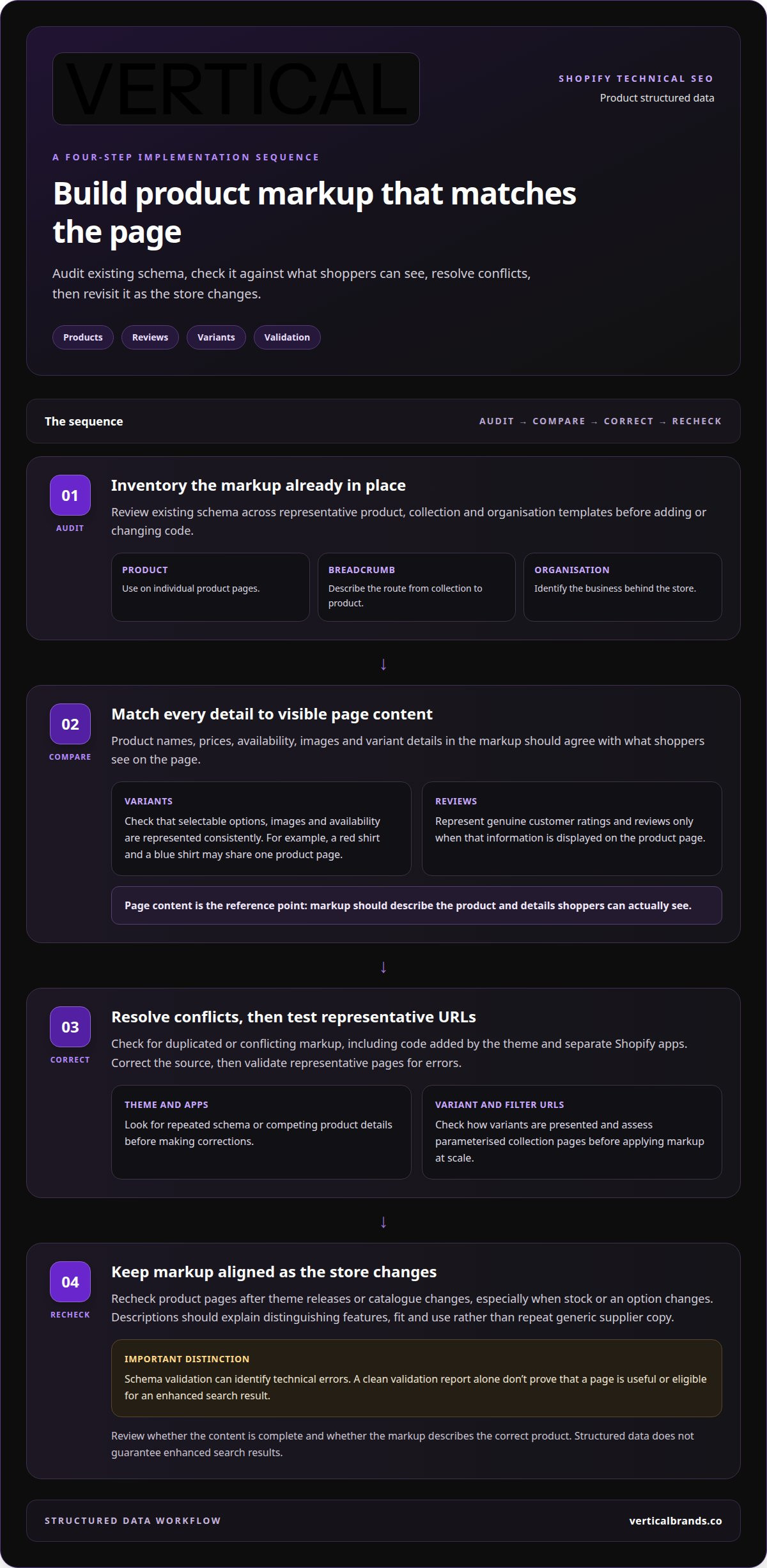
Structured data gives search engines machine-readable details about a page. On a Shopify store, a specialist audits existing schema before adding or correcting product markup. The first check is consistency: product names, prices, availability, images and variant details in the markup must match what shoppers see on the page.
Product structured data can describe an item and its visible attributes. Review markup can represent genuine customer ratings and reviews displayed on the product page. A specialist checks that review information appears on-page and is accurately represented in the markup. Markup cannot turn missing reviews into valid review data, and it does not guarantee enhanced search results.
Schema should reflect each page’s purpose. Product schema belongs on individual product pages, while breadcrumb schema can describe the route from a collection to a product. Organisation schema can identify the business behind the store. A specialist checks for conflicting or duplicated markup, including code added by a theme and separate Shopify apps.
Product variants need particular attention. A red shirt and a blue shirt may share a product page, but their selectable options, images and availability should be represented consistently. The specialist checks whether the theme presents variants as choices on one page or exposes separate URLs. Faceted collection filters can also create parameterised URLs; assess those pages before applying markup at scale.
Content quality supports accurate structured data. A collection page should have a concise introduction that describes the category, such as waterproof coats for winter walking. A product description should explain distinguishing features, fit and use rather than repeat generic supplier copy. Product details need to match the schema, including when stock or an option changes.
Implementation follows a controlled sequence:
- Inventory product, collection and organisation markup across representative templates.
- Compare structured data with visible page content, variants and review details.
- Correct theme or app conflicts, then test representative URLs for validation errors.
- Recheck product pages after theme releases or catalogue changes.
Schema validation identifies technical errors, but a clean report alone doesn’t prove the page is useful or eligible for a search enhancement. A specialist also checks whether the page content is complete and whether markup describes the correct product. If original product imagery and customer-created assets are part of the content plan, UGC content can support richer product-page presentation, while structured data remains aligned with details shoppers can see.
How a specialist submits Shopify sitemaps to Google Search Console and Bing Webmaster Tools
Shopify generates a sitemap automatically, giving search engines a structured route to discover store pages. A specialist reviews it before submission, checking that it includes pages intended for indexing and excludes irrelevant or duplicate URLs. Submitting a sitemap supports discovery, but does not guarantee that every listed page will appear in search results.
In Google Search Console, the specialist confirms access to the correct Shopify property, then submits the sitemap.xml file through the sitemap report. They review its reported status and investigate processing errors, missing pages or unexpected URL patterns. Following the same process in Bing Webmaster Tools gives Bing a submitted sitemap and a separate place to monitor processing.
Submission is only one part of the check. The specialist compares sitemap entries with the store’s intended indexable pages. For example, a live product page may belong in the sitemap, while a filtered collection URL may not. If a key collection is absent, the specialist checks its status, canonical setup and internal linking before concluding that the sitemap is the cause.
Shopify’s robots.txt controls also need review alongside the XML sitemap. A sitemap can list a page, but crawl directives may affect whether search engines can access it. The specialist checks robots.txt rules for accidental restrictions on important product or collection paths. They also assess redirects and outdated URLs, so search engines reach current destinations instead of following chains through obsolete pages.
After submission, the specialist tracks sitemap status, indexed-page coverage and relevant analytics. Google Search Console can show whether submitted pages are indexed or have reported issues. Search performance data then helps connect technical visibility with impressions and clicks. Bing Webmaster Tools provides a separate view of Bing’s sitemap processing, so the status in one search engine is not treated as proof of the other’s.
For a reliable audit, choose a specialist who can explain how sitemap findings connect to crawl access, indexing and page priorities. The cost depends on the store’s size, URL complexity, app-generated pages and the depth of analysis or implementation required.
A practical review follows a clear sequence:
- Inspect the automatically generated Shopify sitemap and its page types.
- Submit sitemap.xml in Google Search Console and Bing Webmaster Tools.
- Review processing reports, robots.txt controls, redirects and indexing signals.
- Resolve mismatches, then monitor whether priority pages appear in search data.
Keep sitemap reviews active after catalogue or theme changes. A new collection, removed product or app-generated URL can change what search engines discover. Rechecking the sitemap alongside Search Console reports helps identify whether the issue lies in submission, crawl access or page eligibility, rather than assuming resubmission alone will resolve it.
Canonical URLs and duplicate product pages
A Shopify product can be reached through a collection path or a direct product URL. Those routes may create duplicate versions of the same page. A specialist checks which URL should represent each product, then confirms that alternate paths point to a single canonical URL. This helps search engines consolidate signals instead of treating several versions as separate pages.
Canonical tags need to match the store’s intended structure. For example, if a product is linked from two collections, the specialist checks that both collection paths identify the preferred product URL. They also inspect the rendered page source after theme or app changes. Canonical tags should be reviewed to ensure they reflect the store’s intended URL structure. Where possible, broken canonicals are corrected at template level, then tested across representative product pages.
Collection filters need a separate review. A colour or size filter can generate URLs with parameters, while filter combinations may create low-value pages. The specialist assesses whether those URLs offer distinct content or merely repeat the original collection. They preserve crawlable collection pages that serve clear shopping intent, while managing duplicate or thin variations with suitable canonical and indexation signals.
Shopify apps can also change URL behaviour. A specialist reviews whether an app creates duplicate URLs, thin indexable pages or broken canonicals. They map the affected templates, identify the source and implement a correction without blocking useful product or collection pages. Redirects are considered when URLs have changed and a replacement destination exists. A redirect should not replace a correct canonical when the original page remains available.
Google Search Console helps prioritise which canonical issues to address first. The specialist reviews search performance by page and query, then identifies relevant pages ranking on page two. For example, a collection receiving impressions for a valuable category keyword may merit attention before a low-visibility filtered URL. Ranking position is one signal, alongside whether the page is indexable, useful and aligned with the query.
After changes, Search Console can help reveal whether Google selects the intended canonical or reports another version. The specialist compares reported indexing with the preferred URL and checks a sample of related pages. If Google continues selecting an alternate URL, the review returns to internal links, redirects, page content and canonical consistency. Each signal matters when diagnosing the cause.
- Map product URLs created through collections, tags and filters.
- Confirm one preferred canonical URL for each product page.
- Review filtered collections and app-generated pages for duplication or thin content.
- Use Search Console ranking data to prioritise relevant page-two opportunities.
- Recheck canonical selection and indexing after implementation.
Preparing your Shopify store for a technical SEO audit
A useful audit starts with a clear baseline, not a list of isolated errors. The specialist records current organic clicks, impressions and conversions in Google Search Console and GA4 before changing the store. This makes later comparisons meaningful and helps separate technical effects from normal changes in demand.
Next, define the audit’s scope. It should cover the whole ecommerce site, including product templates, collection pages, blog posts and mobile layouts. A specialist maps these page types against key journeys, such as moving from a buying guide to a collection and then to a product. The map reveals gaps in internal linking, inaccessible pages and repeated template issues.
Technical checks should connect causes to their impact. The specialist reviews crawl and index reports, sitemap status, robots.txt controls, redirects, canonical tags and structured data. For example, a collection page blocked from crawling may matter more than a minor warning on an obsolete URL. Findings are prioritised according to the pages and user journeys they affect.
Assess performance with the same page-level discipline. Core Web Vitals and PageSpeed results help identify slow templates, heavy scripts and layout shifts. Across a large catalogue, the audit prioritises pages with the greatest search impact instead of treating every URL equally. Mobile testing also checks whether navigation, product options and page content remain usable on smaller screens.
Preparation includes a change history. The specialist records theme releases, app installations, URL changes and major content updates. Where practical, they change one thing at a time, then monitor its effect. This reduces confusion when several fixes could affect the same collection or product template.
Audit frequency depends on the store’s change pattern. A full technical audit every six months can identify structural issues before they accumulate. A monthly mini audit can review Core Web Vitals, PageSpeed issues, 4xx errors and sitemap errors. A sudden traffic drop greater than 30 percent without a clear cause is a trigger for a full investigation.
Before work begins, the store operator can provide access to Google Search Console and GA4, plus a record of recent releases and priority pages. The specialist can then define scope around business-critical templates, markets and conversion paths. Without a baseline or change record, attributing later movements becomes harder.
- Record Search Console and GA4 performance before implementation.
- Map product, collection and blog templates to key customer journeys.
- Review crawl, index, speed, mobile, redirects and markup together.
- Keep a change log and isolate fixes where practical.
- Schedule a six-month full audit and monthly technical reviews.
For a structured review of your store’s technical SEO, plan a Shopify SEO audit around the pages and issues with the greatest search impact. The audit findings is most useful when each recommendation has a clear priority and measurable follow-up.
Vertical Brands
Vertical Brands helps Shopify businesses turn technical SEO findings into a prioritised plan. Its Search Engine Optimisation service is relevant when crawl issues, duplicate URLs, weak internal linking or unclear audit priorities are limiting progress. The work connects technical fixes with the pages and customer journeys that matter to the business, giving teams a clearer basis for tracking implementation and results.
Turn to Vertical Brands when your store needs specialist SEO support, particularly after a redesign, catalogue change or unexplained decline in organic performance. The next step is to discuss your store’s objectives, recent changes and priority pages. A focused brief helps shape the audit around real business needs. Contact Vertical Brands to discuss your Shopify SEO requirements.
Build a stronger foundation for organic growth
Technical SEO creates value when it supports the store’s wider commercial priorities. Connect technical work with clear ownership: who implements changes, how their effect is assessed and which pages matter most to the business. That turns an audit into an operating plan rather than a document that sits untouched.
Use a technical SEO checklist for Shopify as a planning tool, keeping the focus on decisions that improve how customers discover and use the store. Align technical priorities with the wider growth plan so teams can coordinate their work without losing sight of customer experience.
Vertical Brands offers Search Engine Optimisation alongside Klaviyo Email Marketing, Email Marketing & CRM Management and Paid Social. If you want to discuss how specialist support could fit your store’s priorities, contact Vertical Brands. A focused plan gives your team a clearer route from technical improvements to sustainable growth.
Frequently Asked Questions
What is a technical SEO audit?
A technical SEO audit assesses whether a website’s structure and configuration allow search engines to access, understand and index its pages. For a Shopify store, a specialist examines crawl access, page templates, mobile usability and URL handling. The audit also connects findings to business priorities. For example, a problem affecting a key product template may deserve attention before an isolated issue on an outdated page.
Which fix on the list matters most?
Prioritise issues that prevent valuable pages from being crawled or indexed. A strong product page cannot attract organic visibility if search engines cannot access it or recognise its intended URL. A specialist weighs the affected pages, their commercial role and the scale of the problem. For example, a template-level directive affecting an entire product range merits earlier investigation than a minor issue on one retired item.
What is the technical SEO checklist for a Shopify store?
A practical checklist covers crawl access, indexation, sitemap health, canonical URLs, redirects, broken links, structured data, mobile usability and page performance. It also checks whether important pages connect through useful internal links. A specialist reviews these areas across representative templates, not just the homepage. This helps reveal whether an error affects one URL, a whole collection or every product page using the same theme.
How can a specialist manage Shopify canonical tags and duplicate URLs?
A specialist traces duplicate URLs to their source, such as collection paths, filters, tags or an app. They then compare canonical tags with preferred URLs and the links pointing to those pages. For example, if internal links consistently favour an alternate product path, the specialist investigates that mismatch instead of changing tags in isolation. After implementation, they review search engine canonical selection for affected pages.
How does a specialist fix Shopify crawl errors, redirects and broken links?
A specialist groups crawl errors by cause, then checks whether each URL should remain live, redirect or return an error. For a moved product, they map the old address to its closest relevant replacement and update internal links to point directly there. For a broken link to a discontinued item without a suitable replacement, they assess the page’s role before choosing a response. A follow-up crawl checks whether the original issue remains.
Which technical SEO tools can audit a Shopify store, and what do they cost?
Google Search Console and Bing Webmaster Tools can monitor sitemap and indexing status, while PageSpeed and real-user data help assess page performance.